<?xml version="1.0" encoding="utf-8"?><feed xmlns="http://www.w3.org/2005/Atom" xml:lang="ko"><generator uri="https://jekyllrb.com/" version="3.10.0">Jekyll</generator><link href="https://songyee-ai.github.io/blog/feed.xml" rel="self" type="application/atom+xml" /><link href="https://songyee-ai.github.io/blog/" rel="alternate" type="text/html" hreflang="ko" /><updated>2026-09-15T01:03:34+09:00</updated><id>https://songyee-ai.github.io/blog/feed.xml</id><title type="html">AI Agent 학습 기록</title><subtitle>AI Agent 수업에서 배운 개념, 실습 코드, 막혔던 지점과 해결 과정을 회차별로 정리하는 학습 블로그입니다.</subtitle><author><name>김송이</name></author><entry><title type="html">임베딩</title><link href="https://songyee-ai.github.io/blog/2026/09/13/term-embedding/" rel="alternate" type="text/html" title="임베딩" /><published>2026-09-13T00:00:00+09:00</published><updated>2026-09-13T00:00:00+09:00</updated><id>https://songyee-ai.github.io/blog/2026/09/13/term-embedding</id><content type="html" xml:base="https://songyee-ai.github.io/blog/2026/09/13/term-embedding/"><![CDATA[<!-- TODO: 회차 확정 — 수업에서 이 개념을 다루는 리뷰 글이 올라오면 lesson 값과 3번 섹션을 갱신할 것 -->

<h2 id="한-줄-정의">한 줄 정의</h2>

<blockquote>
  <p>단어나 문장의 뜻을 숫자 여러 개로 바꿔 놓은 것</p>
</blockquote>

<hr />

<h2 id="1-비유로-이해하기">1. 비유로 이해하기</h2>

<p><strong>지도 위의 좌표</strong>를 떠올리면 된다.</p>

<p>서울과 인천은 좌표가 가깝고, 부산은 멀다. 두 도시를 가 본 적이 없어도 <strong>좌표 숫자만 비교하면</strong> 어디가 가까운지 알 수 있다. 지도가 하는 일이 그것이다. 장소를 숫자 두 개로 바꿔 놓아서, 거리를 계산으로 구할 수 있게 만든다.</p>

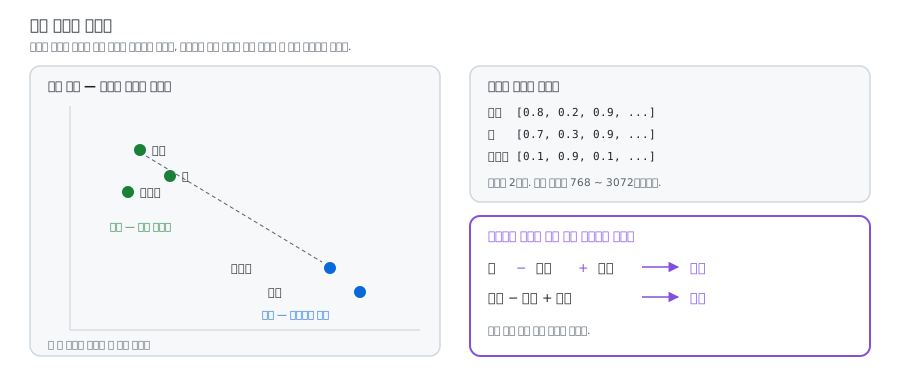
<p>임베딩은 <strong>뜻에 좌표를 붙이는 일</strong>이다.</p>

<figure class="post-figure">
  <img src="/blog/assets/images/term-embedding/meaning-map.svg" alt="뜻을 좌표로 바꾸면 사과와 배는 가까운 자리에 자동차와 기차는 다른 쪽에 모이며, 좌표끼리 더하고 빼면 왕에서 남자를 빼고 여자를 더하면 여왕에 가까워진다" loading="lazy" />
  <figcaption>그림 1. 뜻에 좌표를 붙이면, 가깝고 먼 것이 계산으로 나온다</figcaption>
</figure>

<div class="language-plaintext highlighter-rouge"><div class="highlight"><pre class="highlight"><code>사과   → [0.8, 0.2, 0.9, ...]  ┐
배     → [0.7, 0.3, 0.9, ...]  ┘ 좌표가 가깝다
자동차 → [0.1, 0.9, 0.1, ...]    멀리 떨어져 있다
</code></pre></div></div>

<p>실제 임베딩은 좌표가 두 개가 아니라 <strong>768개, 1536개, 3072개</strong>쯤 된다. 지도가 2차원이라면, 뜻의 지도는 수백 차원인 셈이다.</p>

<p>그리고 이 좌표계에서는 신기한 일이 벌어진다. 좌표끼리 더하고 빼면 <strong>뜻도 더해지고 빠진다.</strong></p>

<div class="language-plaintext highlighter-rouge"><div class="highlight"><pre class="highlight"><code>왕 − 남자 + 여자 ≈ 여왕
서울 − 한국 + 일본 ≈ 도쿄
</code></pre></div></div>

<p>숫자 안에 뜻이 담겨 있다는 증거다.</p>

<hr />

<h2 id="2-왜-필요한가">2. 왜 필요한가</h2>

<p>컴퓨터는 “사과”라는 글자를 봐도 그게 “배”와 비슷하고 “자동차”와 다르다는 걸 모른다. 글자는 그냥 부호이기 때문이다. 숫자로 바꿔 놓아야 <strong>계산으로 비교</strong>할 수 있게 된다.</p>

<h3 id="의미로-검색한다">의미로 검색한다</h3>

<p>데이터베이스에서 하는 검색은 <strong>글자가 정확히 같아야</strong> 찾아진다. “고양이”로 검색하면 “냥이”도 “반려묘”도 안 나온다.</p>

<p>임베딩 검색은 뜻으로 찾는다.</p>

<div class="language-plaintext highlighter-rouge"><div class="highlight"><pre class="highlight"><code>질문: "우리 회사 휴가 며칠이야?"
   ↓ 임베딩으로 변환
   ↓ 좌표가 가까운 문서 찾기
찾은 문서: "연차 규정: 입사 1년 후 15일 부여"
           ← "휴가"라는 단어가 한 번도 안 나오는데 찾아냈다
</code></pre></div></div>

<p>이 방식을 <strong>의미 검색(semantic search)</strong>이라고 하고, 이걸로 문서를 찾아 답하는 구조를 <strong>RAG(검색 증강 생성)</strong>라고 부른다.</p>

<h3 id="에이전트에서-쓰이는-곳">에이전트에서 쓰이는 곳</h3>

<table>
  <thead>
    <tr>
      <th>용도</th>
      <th>설명</th>
    </tr>
  </thead>
  <tbody>
    <tr>
      <td><strong>문서 검색 (RAG)</strong></td>
      <td>회사 문서에서 관련된 부분만 찾아 모델에 전달</td>
    </tr>
    <tr>
      <td><strong>장기 기억</strong></td>
      <td>과거 대화를 저장해 두고 관련된 것만 꺼내 온다</td>
    </tr>
    <tr>
      <td><strong>도구 선택</strong></td>
      <td>도구가 100개면 다 넣을 수 없으니 관련된 몇 개만 골라 넣는다</td>
    </tr>
    <tr>
      <td><strong>중복 제거</strong></td>
      <td>비슷한 내용인지 판단한다</td>
    </tr>
  </tbody>
</table>

<h3 id="코드로-보면">코드로 보면</h3>

<div class="language-python highlighter-rouge"><div class="highlight"><pre class="highlight"><code><span class="c1"># 미리: 문서들을 임베딩으로 바꿔 저장 (한 번만)
</span><span class="k">for</span> <span class="n">doc</span> <span class="ow">in</span> <span class="n">documents</span><span class="p">:</span>
    <span class="n">vec</span> <span class="o">=</span> <span class="n">embed</span><span class="p">(</span><span class="n">doc</span><span class="p">)</span>              <span class="c1"># 문장 → 숫자 1536개
</span>    <span class="n">vector_db</span><span class="p">.</span><span class="n">save</span><span class="p">(</span><span class="n">doc</span><span class="p">,</span> <span class="n">vec</span><span class="p">)</span>

<span class="c1"># 질문이 올 때마다
</span><span class="n">q_vec</span> <span class="o">=</span> <span class="n">embed</span><span class="p">(</span><span class="s">"휴가 며칠?"</span><span class="p">)</span>        <span class="c1"># 질문도 같은 방식으로 숫자화
</span><span class="n">results</span> <span class="o">=</span> <span class="n">vector_db</span><span class="p">.</span><span class="n">search</span><span class="p">(</span><span class="n">q_vec</span><span class="p">,</span> <span class="n">top_k</span><span class="o">=</span><span class="mi">3</span><span class="p">)</span>   <span class="c1"># 가까운 문서 3개
</span>
<span class="c1"># 찾은 문서를 모델에게 같이 건네준다
</span><span class="n">answer</span> <span class="o">=</span> <span class="n">call_model</span><span class="p">(</span><span class="sa">f</span><span class="s">"참고자료: </span><span class="si">{</span><span class="n">results</span><span class="si">}</span><span class="se">\n\n</span><span class="s">질문: 휴가 며칠?"</span><span class="p">)</span>
</code></pre></div></div>

<p>“가깝다”를 계산하는 방법은 <strong>코사인 유사도</strong>를 주로 쓴다. 두 좌표가 같은 방향을 가리키는지 재는 방법이고, 결과는 -1(정반대)에서 1(똑같음) 사이로 나온다.</p>

<p>임베딩을 저장하는 전용 창고를 <strong>벡터 데이터베이스</strong>라고 한다. Pinecone, Chroma, Qdrant 같은 것들이다. SQLite에도 확장 기능을 붙이면 벡터 검색이 되기 때문에, 처음 만들 때는 SQLite 하나로 충분한 경우가 많다.</p>

<hr />

<h2 id="3-어디서-만났나">3. 어디서 만났나</h2>

<p>이 용어는 수업에서 정식으로 다루기 전에 따로 정리한 것이다.</p>

<p>다만 <strong>6회차</strong>에 임베딩이 왜 필요한지를 정확히 보여 주는 자리가 있었다. 데이터베이스에서 <code class="language-plaintext highlighter-rouge">WHERE user = '민수'</code> 같은 검색은 글자가 딱 맞아야 찾아진다. 이 한계가 곧 임베딩이 필요한 이유다.</p>

<p><a href="/blog/2026/09/04/database-sql-backup/">6회차 — 데이터베이스, 서비스의 기억을 어디에 어떤 모양으로 둘까</a></p>

<hr />

<h2 id="4-헷갈리는-개념">4. 헷갈리는 개념</h2>

<table>
  <thead>
    <tr>
      <th>이 용어</th>
      <th>비슷하지만 다른 것</th>
      <th>차이</th>
    </tr>
  </thead>
  <tbody>
    <tr>
      <td>임베딩</td>
      <td><strong>벡터</strong></td>
      <td>벡터는 <strong>그릇의 모양</strong>(숫자 한 줄), 임베딩은 그 그릇에 담긴 <strong>뜻</strong>이다</td>
    </tr>
    <tr>
      <td>임베딩</td>
      <td>토큰</td>
      <td>토큰은 글자를 자른 조각. 임베딩은 그 조각에 붙이는 숫자 좌표</td>
    </tr>
    <tr>
      <td>임베딩</td>
      <td>RAG</td>
      <td>임베딩은 <strong>재료</strong>, RAG는 그 재료로 문서를 찾아 답하는 <strong>구조</strong></td>
    </tr>
    <tr>
      <td>임베딩</td>
      <td>웹의 임베드</td>
      <td>유튜브 영상을 블로그에 삽입하는 것도 embed다. 뿌리는 같다 — “다른 곳에 끼워 넣는다”</td>
    </tr>
  </tbody>
</table>

<hr />

<h2 id="5-많이들-오해하는-지점">5. 많이들 오해하는 지점</h2>

<p><strong>ㄱ. “임베딩이랑 벡터가 같은 말 아닌가”</strong></p>

<p>거의 같이 쓰이지만 층이 다르다.</p>

<ul>
  <li><strong>벡터</strong> — 숫자를 한 줄로 늘어놓은 <strong>그릇의 모양</strong></li>
  <li><strong>임베딩</strong> — 그 그릇에 <strong>뜻을 담아 놓은 것</strong></li>
</ul>

<p>모든 임베딩은 벡터다. 하지만 모든 벡터가 임베딩은 아니다. 키·몸무게·나이를 늘어놓은 <code class="language-plaintext highlighter-rouge">[172, 65, 30]</code>도 벡터지만 임베딩은 아니다. <strong>학습을 통해 뜻이 좌표로 배치된 것</strong>만 임베딩이다.</p>

<p><strong>ㄴ. “숫자 칸마다 무슨 뜻인지 정해져 있겠지”</strong></p>

<p>3번째 숫자가 ‘단맛’, 7번째가 ‘크기’ 같은 식으로 정해져 있다고 생각하기 쉽다. 그렇지 않다. <strong>각 숫자가 무슨 뜻인지는 아무도 모른다.</strong> 사람이 정한 게 아니라 AI가 학습으로 알아낸 배치라서, 열어 봐도 읽히지 않는다.</p>

<p>우리가 아는 건 결과뿐이다. 뜻이 비슷하면 좌표가 가깝게 배치된다는 것.</p>

<p><strong>ㄷ. “임베딩을 쓰면 검색이 정확해진다”</strong></p>

<p>가장 값비싼 오해다. 임베딩 검색은 뜻이 <strong>비슷한</strong> 걸 찾아 주지, <strong>정확한</strong> 걸 찾아 주지 않는다.</p>

<p>주문번호 <code class="language-plaintext highlighter-rouge">A-20260913</code>, 날짜, 사람 이름, 상품 코드처럼 <strong>딱 맞아야 하는 것</strong>은 오히려 기존 방식이 낫다. “A-20260913” 근처에 “A-20260914”가 있으면 임베딩 검색은 그것도 비슷하다고 가져온다.</p>

<p>그래서 실무에서는 둘을 섞어 쓴다. 정확히 일치해야 하는 건 데이터베이스에, 뜻으로 찾아야 하는 건 임베딩에 맡기는 식이다.</p>

<hr />

<h2 id="6-관련-용어">6. 관련 용어</h2>

<p><a class="term-link" href="/blog/2026/09/13/term-vector/">벡터</a> · <a class="term-link" href="/blog/2026/09/07/term-token/">토큰</a> · <a class="term-link" href="/blog/2026/09/04/term-sqlite/">SQLite</a> · 데이터베이스 · <a class="term-link" href="/blog/2026/09/13/term-qkv/">Q/K/V</a> · <a class="term-link" href="/blog/2026/09/13/term-tensor/">텐서</a></p>]]></content><author><name>김송이</name></author><category term="glossary" /><category term="AI기초" /><category term="임베딩" /><category term="벡터" /><category term="RAG" /><category term="의미검색" /><summary type="html"><![CDATA[]]></summary></entry><entry><title type="html">게이트</title><link href="https://songyee-ai.github.io/blog/2026/09/13/term-gate/" rel="alternate" type="text/html" title="게이트" /><published>2026-09-13T00:00:00+09:00</published><updated>2026-09-13T00:00:00+09:00</updated><id>https://songyee-ai.github.io/blog/2026/09/13/term-gate</id><content type="html" xml:base="https://songyee-ai.github.io/blog/2026/09/13/term-gate/"><![CDATA[<!-- TODO: 회차 확정 — 수업에서 게이트/승인을 정식으로 다루는 리뷰 글이 올라오면 lesson 값과 3번 섹션을 갱신할 것 -->

<h2 id="한-줄-정의">한 줄 정의</h2>

<blockquote>
  <p>통과시켜도 되는지 검사하는 문. 에이전트의 브레이크</p>
</blockquote>

<hr />

<h2 id="1-비유로-이해하기">1. 비유로 이해하기</h2>

<p>놀이공원 롤러코스터 입구를 떠올리면 된다.</p>

<ul>
  <li>키 재는 막대 — 130cm가 안 되면 못 탄다</li>
  <li>표 검사 — 표가 없으면 못 들어간다</li>
  <li>직원 — “안전벨트 확인하셨나요?”</li>
</ul>

<p>이 문들의 공통점은 <strong>통과시킬지 말지를 판단한다</strong>는 것이다. 그리고 더 중요한 공통점이 하나 있다. 문은 <strong>문제가 커지기 전에 앞에서 막는다.</strong> 롤러코스터가 출발한 다음에 “키가 작으시네요”라고 하면 이미 늦었다.</p>

<figure class="post-figure">
  <img src="/blog/assets/images/term-gate/three-ways.svg" alt="게이트는 통과, 차단, 우회 세 갈래로 흐름을 나눈다" loading="lazy" />
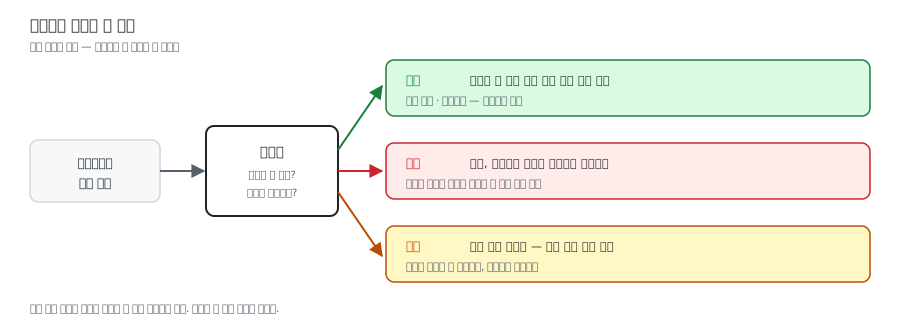
  <figcaption>그림 1. 게이트는 막기만 하는 장치가 아니라, 세 갈래로 길을 나누는 지점이다</figcaption>
</figure>

<hr />

<h2 id="2-왜-필요한가">2. 왜 필요한가</h2>

<p>에이전트는 스스로 판단해서 행동한다. 그래서 <strong>“이 판단을 그대로 실행해도 되는가?”</strong>를 검사하는 문이 반드시 필요하다. 게이트가 없는 에이전트는 브레이크 없는 자동차다.</p>

<h3 id="판단-기준은-딱-하나">판단 기준은 딱 하나</h3>

<p><strong>“실수했을 때 되돌릴 수 있는가?”</strong></p>

<table>
  <thead>
    <tr>
      <th>행동</th>
      <th>문이 필요한가</th>
      <th>이유</th>
    </tr>
  </thead>
  <tbody>
    <tr>
      <td>파일 읽기</td>
      <td>아니오</td>
      <td>되돌릴 수 있다</td>
    </tr>
    <tr>
      <td>검색하기</td>
      <td>아니오</td>
      <td>부작용이 없다</td>
    </tr>
    <tr>
      <td>메일 보내기</td>
      <td><strong>예</strong></td>
      <td>보내면 회수 불가</td>
    </tr>
    <tr>
      <td>파일 삭제</td>
      <td><strong>예</strong></td>
      <td>복구가 어렵다</td>
    </tr>
    <tr>
      <td>결제하기</td>
      <td><strong>예</strong></td>
      <td>돈이 나간다</td>
    </tr>
    <tr>
      <td>코드 배포</td>
      <td><strong>예</strong></td>
      <td>실제 서비스에 영향</td>
    </tr>
  </tbody>
</table>

<h3 id="게이트의-종류">게이트의 종류</h3>

<p><strong>승인 게이트</strong> — 되돌릴 수 없는 행동 앞에서 사람에게 물어본다. <strong>HITL(Human-in-the-Loop)</strong>이라고도 부른다.</p>

<p><strong>품질 게이트</strong> — 다음 단계로 넘어가기 전에 자동으로 검사한다.</p>

<div class="language-plaintext highlighter-rouge"><div class="highlight"><pre class="highlight"><code>에이전트가 코드 작성
   ↓
[게이트 1] 문법 오류 없나? ──실패──▶ 다시 고쳐
   ↓ 통과
[게이트 2] 테스트 통과하나? ──실패──▶ 다시 고쳐
   ↓ 통과
[게이트 3] 사람 리뷰 ──────────────▶ 승인 후 반영
</code></pre></div></div>

<p><strong>안전 게이트</strong> — 들어오는 질문이 위험한 요청은 아닌지(입력), 나가는 답변에 개인정보나 API 키가 섞이지 않았는지(출력) 확인한다.</p>

<h3 id="코드로-보면">코드로 보면</h3>

<p>앞서 본 하네스 루프에 게이트를 넣으면 이렇게 된다.</p>

<div class="language-python highlighter-rouge"><div class="highlight"><pre class="highlight"><code><span class="n">DANGEROUS_TOOLS</span> <span class="o">=</span> <span class="p">{</span><span class="s">"send_email"</span><span class="p">,</span> <span class="s">"delete_file"</span><span class="p">,</span> <span class="s">"make_payment"</span><span class="p">}</span>

<span class="k">for</span> <span class="n">call</span> <span class="ow">in</span> <span class="n">response</span><span class="p">.</span><span class="n">tool_calls</span><span class="p">:</span>
    <span class="c1"># ▼▼▼ 여기가 게이트 ▼▼▼
</span>    <span class="k">if</span> <span class="n">call</span><span class="p">.</span><span class="n">name</span> <span class="ow">in</span> <span class="n">DANGEROUS_TOOLS</span><span class="p">:</span>
        <span class="k">print</span><span class="p">(</span><span class="sa">f</span><span class="s">"[확인] </span><span class="si">{</span><span class="n">call</span><span class="p">.</span><span class="n">name</span><span class="si">}</span><span class="s"> 을(를) 실행할까요?"</span><span class="p">)</span>
        <span class="k">print</span><span class="p">(</span><span class="sa">f</span><span class="s">"       내용: </span><span class="si">{</span><span class="n">call</span><span class="p">.</span><span class="nb">input</span><span class="si">}</span><span class="s">"</span><span class="p">)</span>
        <span class="k">if</span> <span class="nb">input</span><span class="p">(</span><span class="s">"y/n &gt; "</span><span class="p">)</span> <span class="o">!=</span> <span class="s">"y"</span><span class="p">:</span>
            <span class="n">result</span> <span class="o">=</span> <span class="s">"사용자가 거절했습니다."</span>
            <span class="n">messages</span><span class="p">.</span><span class="n">append</span><span class="p">(</span><span class="n">to_message</span><span class="p">(</span><span class="n">result</span><span class="p">))</span>
            <span class="k">continue</span>                  <span class="c1"># 실행하지 않고 넘어간다
</span>    <span class="c1"># ▲▲▲ 게이트 끝 ▲▲▲
</span>
    <span class="n">result</span> <span class="o">=</span> <span class="n">run_tool</span><span class="p">(</span><span class="n">call</span><span class="p">.</span><span class="n">name</span><span class="p">,</span> <span class="n">call</span><span class="p">.</span><span class="nb">input</span><span class="p">)</span>
    <span class="n">messages</span><span class="p">.</span><span class="n">append</span><span class="p">(</span><span class="n">to_message</span><span class="p">(</span><span class="n">result</span><span class="p">))</span>
</code></pre></div></div>

<h3 id="설계할-때-지킬-것">설계할 때 지킬 것</h3>

<table>
  <thead>
    <tr>
      <th>원칙</th>
      <th>설명</th>
    </tr>
  </thead>
  <tbody>
    <tr>
      <td>누적을 봐야 한다</td>
      <td>한 번에 1만 원씩 열 번이면 10만 원. 단계마다 통과해도 합계는 위험할 수 있다</td>
    </tr>
    <tr>
      <td>문이 너무 많으면 무의미하다</td>
      <td>매번 물어보면 사용자가 아무 생각 없이 <code class="language-plaintext highlighter-rouge">y</code>를 누른다</td>
    </tr>
    <tr>
      <td>무엇을 승인하는지 보여줄 것</td>
      <td>“메일 보낼까요?”가 아니라 “누구에게 무슨 내용을”</td>
    </tr>
    <tr>
      <td>기본값은 차단</td>
      <td>애매하면 막는 쪽. 모르는 것은 통과시키지 않는다</td>
    </tr>
  </tbody>
</table>

<hr />

<h2 id="3-어디서-만났나">3. 어디서 만났나</h2>

<p>이 용어 자체는 수업에서 정식으로 다루기 전에 따로 정리한 것이다. 다만 게이트가 필요한 이유는 이미 두 번 만났다.</p>

<p><strong>7회차</strong>에서 에이전트가 파일을 고치고 명령어를 직접 실행하는 구조를 봤다. 스스로 실행한다는 건 곧 스스로 사고도 칠 수 있다는 뜻이었다.</p>

<p><a href="/blog/2026/09/07/agent-mcp-skill/">7회차 — 에이전트, MCP, 스킬 — 범용 AI를 내 전용 조수로</a></p>

<p><strong>8회차</strong>에서는 막혔을 때 되돌아올 자리를 남겨 두는 규율을 배웠다. 게이트는 그 “되돌아올 자리”를 <strong>사고가 나기 전에</strong> 만들어 두는 쪽의 장치다.</p>

<p><a href="/blog/2026/09/08/mvp-scope-five-steps/">8회차 — MVP, 다 만들려 하지 말고 한 흐름이 끝까지 굴러가게</a></p>

<hr />

<h2 id="4-헷갈리는-개념">4. 헷갈리는 개념</h2>

<table>
  <thead>
    <tr>
      <th>이 용어</th>
      <th>비슷하지만 다른 것</th>
      <th>차이</th>
    </tr>
  </thead>
  <tbody>
    <tr>
      <td>게이트</td>
      <td>에러 처리</td>
      <td>에러 처리는 <strong>일이 터진 뒤</strong> 수습한다. 게이트는 <strong>터지기 전에</strong> 막는다</td>
    </tr>
    <tr>
      <td>게이트</td>
      <td>라우팅</td>
      <td>게이트가 <strong>판단</strong>하고, 라우팅이 그 판단에 따라 <strong>실행</strong>한다. “이건 위험해”가 게이트, “그럼 사람에게 보내”가 라우팅</td>
    </tr>
    <tr>
      <td>게이트</td>
      <td>논리 게이트 (AND·OR·NOT)</td>
      <td>전자회로의 게이트. “게이트”라는 말이 컴퓨터 분야로 들어온 출발점이지만, 층이 완전히 다르다</td>
    </tr>
    <tr>
      <td>모델 밖의 게이트</td>
      <td>모델 안의 게이트</td>
      <td>모델 밖에서는 <strong>통과/차단의 문</strong>이다. 모델 안(LSTM, MoE)에서는 <strong>수도꼭지</strong>에 가깝다. 0과 1 사이 값으로 “얼마나 흘려보낼까”를 조절한다</td>
    </tr>
  </tbody>
</table>

<hr />

<h2 id="5-많이들-오해하는-지점">5. 많이들 오해하는 지점</h2>

<p><strong>ㄱ. “문을 많이 세울수록 안전하다”</strong></p>

<p>정반대다. 매번 확인을 요구하면 사람은 내용을 읽지 않고 <code class="language-plaintext highlighter-rouge">y</code>를 누르게 된다. 이걸 <strong>경고 피로(alert fatigue)</strong>라고 하는데, 이 상태가 되면 문이 백 개여도 실질적으로는 하나도 없는 것과 같다. 되돌릴 수 없는 것에만 문을 세워야 문이 의미를 갖는다.</p>

<p><strong>ㄴ. “거절했으면 조용히 넘어가면 된다”</strong></p>

<p>거절당했다는 사실을 <strong>모델에게 알려줘야 한다.</strong> 안 알려주고 그냥 건너뛰면 모델은 그 작업이 성공한 줄 알고 다음 단계로 넘어간다. “메일을 보냈으니 이제 답장을 기다리자”는 식으로 엉뚱한 길을 계속 간다. 거절 사실을 알려주면 모델은 “이건 하면 안 되는구나” 하고 다른 방법을 찾는다.</p>

<p><strong>ㄷ. “게이트 = 차단”</strong></p>

<p>문의 결과는 세 갈래다. <strong>통과 / 차단 / 우회.</strong> 셋째가 특히 중요하다. 확신이 낮으면 더 검색하게 하고, 위험하면 사람에게 보내는 식으로 <strong>다른 길로 돌리는 것</strong>도 게이트의 일이다.</p>

<hr />

<h2 id="6-관련-용어">6. 관련 용어</h2>

<p><a class="term-link" href="/blog/2026/09/07/term-harness/">하네스</a> · <a class="term-link" href="/blog/2026/09/09/term-ai-agent/">AI 에이전트</a> · <a class="term-link" href="/blog/2026/09/13/term-softmax/">소프트맥스</a> · <a class="term-link" href="/blog/2026/09/13/term-root/">루트</a> · <a class="term-link" href="/blog/2026/09/07/term-mcp/">MCP</a></p>]]></content><author><name>김송이</name></author><category term="glossary" /><category term="에이전트" /><category term="게이트" /><category term="승인" /><category term="안전장치" /><summary type="html"><![CDATA[]]></summary></entry><entry><title type="html">행렬</title><link href="https://songyee-ai.github.io/blog/2026/09/13/term-matrix/" rel="alternate" type="text/html" title="행렬" /><published>2026-09-13T00:00:00+09:00</published><updated>2026-09-13T00:00:00+09:00</updated><id>https://songyee-ai.github.io/blog/2026/09/13/term-matrix</id><content type="html" xml:base="https://songyee-ai.github.io/blog/2026/09/13/term-matrix/"><![CDATA[<!-- TODO: 회차 확정 — 수업에서 이 개념을 다루는 리뷰 글이 올라오면 lesson 값과 3번 섹션을 갱신할 것 -->

<h2 id="한-줄-정의">한 줄 정의</h2>

<blockquote>
  <p>숫자를 가로세로 표로 늘어놓은 것. 2차원</p>
</blockquote>

<hr />

<h2 id="1-비유로-이해하기">1. 비유로 이해하기</h2>

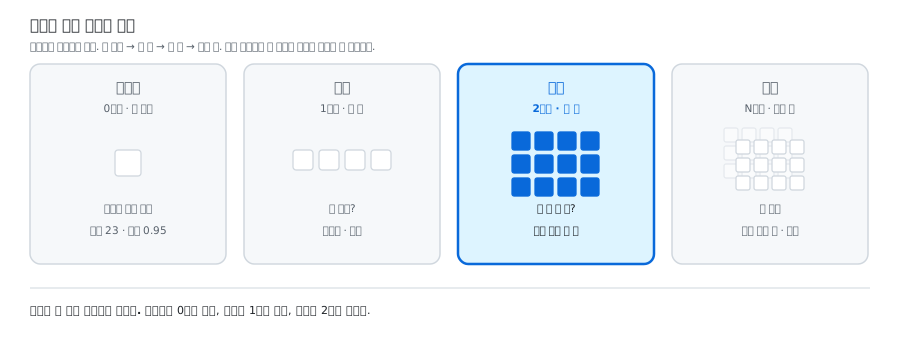
<p>숫자를 담는 그릇을 아파트로 생각하면, 행렬은 <strong>한 동(棟)</strong>이다. 3층 건물에 각 층마다 방이 네 개 있는 식이다.</p>

<figure class="post-figure">
  <img src="/blog/assets/images/term-matrix/apartment-matrix.svg" alt="숫자를 담는 그릇 네 가지 중 행렬은 여러 층으로 이뤄진 한 동에 해당하는 2차원이다" loading="lazy" />
  <figcaption>그림 1. 한 동. 방을 찾으려면 몇 층 몇 번째인지 둘을 대야 한다</figcaption>
</figure>

<p>방을 찾아가려면 <strong>“몇 층, 몇 번째”</strong> 두 가지를 대야 한다. 필요한 정보가 둘이라서 2차원이다.</p>

<div class="language-plaintext highlighter-rouge"><div class="highlight"><pre class="highlight"><code>[[5, 3, 8, 1],     ← 0행
 [2, 7, 4, 9],     ← 1행
 [6, 1, 0, 3]]     ← 2행
  ↑
  0열
</code></pre></div></div>

<hr />

<h2 id="2-왜-필요한가">2. 왜 필요한가</h2>

<h3 id="벡터를-여러-개-쌓으면-행렬이다">벡터를 여러 개 쌓으면 행렬이다</h3>

<p>벡터 하나로는 하나만 다룰 수 있다. 여러 개를 한꺼번에 다루려면 쌓아야 한다.</p>

<table>
  <thead>
    <tr>
      <th>무엇</th>
      <th>모양</th>
    </tr>
  </thead>
  <tbody>
    <tr>
      <td><strong>흑백 사진 한 장</strong></td>
      <td>28×28 행렬. 각 칸이 픽셀의 밝기</td>
    </tr>
    <tr>
      <td><strong>토큰 여러 개의 임베딩</strong></td>
      <td>(토큰 수 × 768) 행렬. 한 줄이 토큰 하나</td>
    </tr>
    <tr>
      <td><strong>엑셀 표</strong></td>
      <td>(행 수 × 열 수). 가장 익숙한 행렬</td>
    </tr>
  </tbody>
</table>

<p>문장 “안녕 세상”을 처리한다면 이렇게 된다.</p>

<div class="language-plaintext highlighter-rouge"><div class="highlight"><pre class="highlight"><code>토큰 2개  →  각 토큰마다 숫자 768개  →  (2, 768) 행렬
</code></pre></div></div>

<h3 id="딥러닝-계산의-거의-전부가-행렬-곱이다">딥러닝 계산의 거의 전부가 행렬 곱이다</h3>

<p>모델 안에서 벌어지는 일을 아주 크게 줄이면 <strong>행렬을 곱하는 것의 반복</strong>이다. GPU가 AI 계산에 쓰이는 이유도 이것이다. GPU는 행렬 곱을 아주 많이, 동시에 하도록 만들어진 칩이다.</p>

<p>그래서 행렬의 <strong>모양(shape)</strong>이 계속 문제가 된다. 곱할 수 있는 모양과 없는 모양이 정해져 있기 때문인데, 이건 아래 5번에서 자세히 본다.</p>

<h3 id="펴기flatten">펴기(Flatten)</h3>

<p>행렬을 벡터로 납작하게 펴는 일도 자주 한다. 손글씨 이미지를 다루는 코드에서 <code class="language-plaintext highlighter-rouge">Flatten</code>이 하는 일이 그것이다.</p>

<div class="language-plaintext highlighter-rouge"><div class="highlight"><pre class="highlight"><code>행렬 (28, 28)  ──Flatten──▶  벡터 (784,)
   사진 한 장                 숫자 784개 한 줄
</code></pre></div></div>

<p>층층이 쌓인 방들을 복도 하나에 쭉 늘어세우는 셈이다. 담긴 숫자는 그대로고 모양만 바뀐다.</p>

<hr />

<h2 id="3-어디서-만났나">3. 어디서 만났나</h2>

<p>이 용어는 수업에서 정식으로 다루기 전에 따로 정리한 것이다.</p>

<p>다만 <strong>1회차</strong>에서 LLM이 무엇인지 배울 때, “대량의 텍스트를 학습해 패턴을 익힌다”는 그 학습과 계산이 전부 행렬 곱으로 이뤄진다. 겉으로 드러나지 않았을 뿐 바닥에 깔려 있던 개념이다.</p>

<p><a href="/blog/2026/08/31/hello-agent/">1회차 — AI Agent 학습 기록을 시작합니다</a></p>

<hr />

<h2 id="4-헷갈리는-개념">4. 헷갈리는 개념</h2>

<table>
  <thead>
    <tr>
      <th>이 용어</th>
      <th>비슷하지만 다른 것</th>
      <th>차이</th>
    </tr>
  </thead>
  <tbody>
    <tr>
      <td>행렬</td>
      <td>벡터</td>
      <td>벡터는 한 줄, 행렬은 여러 줄을 쌓은 표</td>
    </tr>
    <tr>
      <td>행렬</td>
      <td>텐서</td>
      <td>텐서는 차원 수에 제한이 없다. 행렬은 <strong>딱 2차원</strong>인 텐서다</td>
    </tr>
    <tr>
      <td>행렬</td>
      <td>엑셀 표</td>
      <td>모양은 같지만 엑셀은 칸마다 글자도 날짜도 들어간다. 행렬은 <strong>숫자만</strong></td>
    </tr>
    <tr>
      <td><strong>행</strong></td>
      <td><strong>열</strong></td>
      <td>행(行)은 가로줄, 열(列)은 세로줄</td>
    </tr>
  </tbody>
</table>

<hr />

<h2 id="5-많이들-오해하는-지점">5. 많이들 오해하는 지점</h2>

<p><strong>ㄱ. “행렬 곱은 같은 자리끼리 곱하는 것”</strong></p>

<p>가장 비싼 오해다. 같은 자리끼리 곱하는 연산도 따로 있지만(요소별 곱), <strong>행렬 곱은 그게 아니다.</strong></p>

<p>행렬 곱은 <strong>왼쪽의 가로줄과 오른쪽의 세로줄을 짝지어, 하나씩 곱해서 전부 더한다.</strong></p>

<div class="language-plaintext highlighter-rouge"><div class="highlight"><pre class="highlight"><code>왼쪽의 한 행    [1, 2, 3]
오른쪽의 한 열   4
                5
                6
                → 1×4 + 2×5 + 3×6 = 32
</code></pre></div></div>

<p>여기서 중요한 결론이 나온다. 왼쪽의 가로줄 길이와 오른쪽의 세로줄 길이가 <strong>같아야</strong> 짝이 지어진다. 즉 <strong>왼쪽의 열 개수 = 오른쪽의 행 개수</strong>여야 곱할 수 있다.</p>

<p>안 맞으면 바로 에러다. 딥러닝을 하면 지겹도록 보게 되는 메시지가 이것이다.</p>

<div class="language-plaintext highlighter-rouge"><div class="highlight"><pre class="highlight"><code>RuntimeError: mat1 and mat2 shapes cannot be multiplied (32x768 and 512x10)
                                                           └─ 768 ≠ 512
</code></pre></div></div>

<p>읽는 법은 간단하다. <strong>앞 숫자쌍의 뒤 숫자와 뒤 숫자쌍의 앞 숫자가 같은지</strong> 보면 된다.</p>

<p><strong>ㄴ. 행과 열을 반대로 읽는다</strong></p>

<p><strong>행(行)은 가로줄, 열(列)은 세로줄이다.</strong> <code class="language-plaintext highlighter-rouge">shape (3, 4)</code>는 3행 4열, 즉 가로줄이 3개이고 각 줄에 4칸이 있다.</p>

<p>한자로 기억하면 덜 헷갈린다. 열(列)은 <strong>줄지어 서 있는</strong> 모양이라 세로다. 사람이 줄 서 있는 걸 떠올리면 된다.</p>

<p><strong>ㄷ. “행렬은 표니까 행과 열을 바꿔도 같은 것”</strong></p>

<p>다르다. 행과 열을 바꾸는 것을 <strong>전치(transpose)</strong>라고 하는데, 모양 자체가 달라진다. (3, 4)를 전치하면 (4, 3)이다.</p>

<p>그리고 위에서 봤듯 곱할 수 있느냐가 모양으로 정해지므로, <strong>전치는 계산 결과를 완전히 바꾼다.</strong> 실제로 딥러닝 코드에서 모양이 안 맞을 때 전치로 맞추는 일이 자주 있는데, 이건 “형식만 맞추는 것”이 아니라 무엇과 무엇을 짝지을지를 바꾸는 일이다.</p>

<hr />

<h2 id="6-관련-용어">6. 관련 용어</h2>

<p><a class="term-link" href="/blog/2026/09/13/term-vector/">벡터</a> · <a class="term-link" href="/blog/2026/09/13/term-scalar/">스칼라</a> · <a class="term-link" href="/blog/2026/09/13/term-tensor/">텐서</a> · <a class="term-link" href="/blog/2026/09/13/term-embedding/">임베딩</a> · <a class="term-link" href="/blog/2026/09/13/term-mnist/">MNIST</a></p>]]></content><author><name>김송이</name></author><category term="glossary" /><category term="AI기초" /><category term="행렬" /><category term="텐서" /><category term="차원" /><category term="행렬곱" /><summary type="html"><![CDATA[]]></summary></entry><entry><title type="html">MNIST</title><link href="https://songyee-ai.github.io/blog/2026/09/13/term-mnist/" rel="alternate" type="text/html" title="MNIST" /><published>2026-09-13T00:00:00+09:00</published><updated>2026-09-13T00:00:00+09:00</updated><id>https://songyee-ai.github.io/blog/2026/09/13/term-mnist</id><content type="html" xml:base="https://songyee-ai.github.io/blog/2026/09/13/term-mnist/"><![CDATA[<!-- TODO: 회차 확정 — 수업에서 이 개념을 다루는 리뷰 글이 올라오면 lesson 값과 3번 섹션을 갱신할 것 -->

<h2 id="한-줄-정의">한 줄 정의</h2>

<blockquote>
  <p>손으로 쓴 숫자 사진 7만 장. 머신러닝의 첫 연습곡</p>
</blockquote>

<hr />

<h2 id="1-비유로-이해하기">1. 비유로 이해하기</h2>

<p>피아노를 배우면 누구나 「나비야」부터 친다. 프로그래밍을 배우면 누구나 <code class="language-plaintext highlighter-rouge">Hello, World!</code>를 출력한다.</p>

<p><strong>MNIST는 머신러닝의 「나비야」다.</strong> 작고, 깨끗하고, 금방 돌아가고, 남들 점수와 비교하기도 쉽다.</p>

<figure class="post-figure">
  <img src="/blog/assets/images/term-mnist/shape-to-confidence.svg" alt="28 곱하기 28 손글씨 이미지가 784개 숫자로 펴지고 열 개의 점수가 된 다음 소프트맥스를 거쳐 확신의 정도로 바뀐다" loading="lazy" />
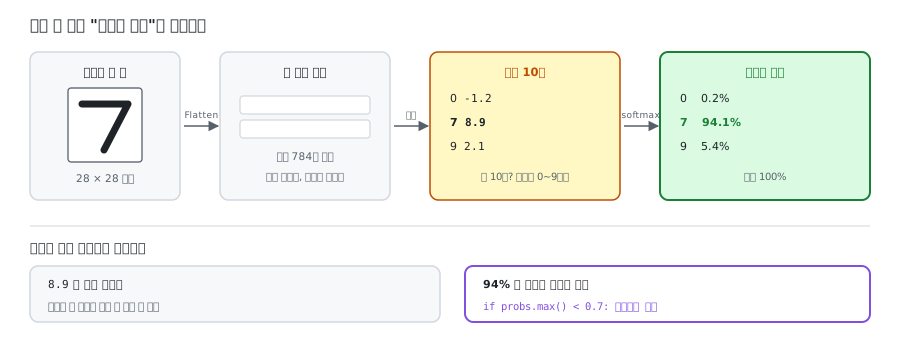
  <figcaption>그림 1. 그림 한 장이 확신의 정도가 되기까지</figcaption>
</figure>

<p>한 장은 이렇게 생겼다.</p>

<div class="language-plaintext highlighter-rouge"><div class="highlight"><pre class="highlight"><code>┌────────────────┐
│  28 × 28 픽셀   │   각 칸에 0(흰색)~255(검정) 숫자
│  회색조 (흑백)   │   → 총 784개 숫자
└────────────────┘
       ↓
   정답 라벨: "7"
</code></pre></div></div>

<hr />

<h2 id="2-왜-필요한가">2. 왜 필요한가</h2>

<table>
  <thead>
    <tr>
      <th>항목</th>
      <th>내용</th>
    </tr>
  </thead>
  <tbody>
    <tr>
      <td>전체 장수</td>
      <td>70,000장</td>
    </tr>
    <tr>
      <td>학습용</td>
      <td>60,000장 (공부용 문제집)</td>
    </tr>
    <tr>
      <td>시험용</td>
      <td>10,000장 (시험지 — 절대 미리 안 본다)</td>
    </tr>
    <tr>
      <td>정답 종류</td>
      <td>10가지 (0~9)</td>
    </tr>
    <tr>
      <td>이름의 뜻</td>
      <td><strong>M</strong>odified <strong>NIST</strong> — 미국 표준기관(NIST) 데이터를 손본 것</td>
    </tr>
  </tbody>
</table>

<p><strong>시험용을 따로 떼어 놓는 이유</strong>가 중요하다. 문제집 답만 외운 학생은 시험을 못 본다. 모델도 학습 데이터만 잘 맞히는 상태가 될 수 있고, 이걸 <strong>과적합(overfitting)</strong>이라고 한다.</p>

<p>솔직히 말하면 MNIST는 에이전트를 만들 때 직접 쓰는 물건이 아니다. 그런데도 알아야 할 이유가 세 가지 있다.</p>

<h3 id="-벤치마크라는-개념의-원형">① 벤치마크라는 개념의 원형</h3>

<p>MNIST는 <strong>“모두가 같은 시험지로 겨루면 누가 나은지 알 수 있다”</strong>는 문화를 만든 데이터다. 그 문화가 그대로 에이전트 시대로 넘어왔다.</p>

<table>
  <thead>
    <tr>
      <th>분야</th>
      <th>표준 시험지</th>
    </tr>
  </thead>
  <tbody>
    <tr>
      <td>손글씨 인식</td>
      <td>MNIST</td>
    </tr>
    <tr>
      <td>이미지 인식</td>
      <td>ImageNet</td>
    </tr>
    <tr>
      <td>언어 이해</td>
      <td>MMLU</td>
    </tr>
    <tr>
      <td><strong>에이전트 코딩</strong></td>
      <td><strong>SWE-bench</strong></td>
    </tr>
    <tr>
      <td><strong>에이전트 도구 사용</strong></td>
      <td><strong>τ-bench</strong></td>
    </tr>
  </tbody>
</table>

<p><strong>평가 하네스(evaluation harness)의 조상</strong>이 MNIST 평가 방식이다. 문제를 꺼내고, 답을 받고, 자동으로 채점하고, 점수를 모으는 그 구조 말이다.</p>

<h3 id="-작게-먼저-돌려-보는-감각">② 작게 먼저 돌려 보는 감각</h3>

<p>노트북에서 몇 분이면 돌아간다. 그래서 코드가 잘못됐는지 바로 알 수 있다. 에이전트를 만들 때도 <strong>작은 데이터로 흐름이 도는지 먼저 확인</strong>하는 습관은 그대로 유효하다. MVP의 감각과 같다.</p>

<h3 id="-벤치마크의-한계도-함께-알려준다">③ 벤치마크의 한계도 함께 알려준다</h3>

<p>MNIST는 이제 <strong>너무 쉬워서 은퇴한 시험지</strong>다. 웬만한 모델이 99% 넘게 맞히니 비교가 무의미해졌다. 이걸 <strong>벤치마크 포화(saturation)</strong>라고 하는데, 지금의 에이전트 벤치마크들도 똑같은 일을 겪고 있다.</p>

<h3 id="소프트맥스와-만나는-지점">소프트맥스와 만나는 지점</h3>

<p>MNIST를 풀면 마지막에 반드시 소프트맥스가 나온다.</p>

<div class="language-python highlighter-rouge"><div class="highlight"><pre class="highlight"><code><span class="n">model</span> <span class="o">=</span> <span class="n">nn</span><span class="p">.</span><span class="n">Sequential</span><span class="p">(</span>
    <span class="n">nn</span><span class="p">.</span><span class="n">Flatten</span><span class="p">(),</span>           <span class="c1"># 28×28 그림 → 784개 숫자 한 줄로
</span>    <span class="n">nn</span><span class="p">.</span><span class="n">Linear</span><span class="p">(</span><span class="mi">784</span><span class="p">,</span> <span class="mi">128</span><span class="p">),</span>    <span class="c1"># 특징 추출
</span>    <span class="n">nn</span><span class="p">.</span><span class="n">ReLU</span><span class="p">(),</span>
    <span class="n">nn</span><span class="p">.</span><span class="n">Linear</span><span class="p">(</span><span class="mi">128</span><span class="p">,</span> <span class="mi">10</span><span class="p">),</span>     <span class="c1"># 10개 점수 = 로짓
</span>    <span class="c1"># ↓ 여기서 소프트맥스
</span><span class="p">)</span>
</code></pre></div></div>

<p>왜 하필 10개일까. <strong>정답이 0~9, 열 가지</strong>라서다.</p>

<div class="language-plaintext highlighter-rouge"><div class="highlight"><pre class="highlight"><code>그림 "7"을 넣으면
    ↓
로짓 (원점수)            소프트맥스 통과
  0: -1.2                  0:  0.2%
  7:  8.9        ──▶       7: 94.1%   ← "7이라고 94% 확신한다"
  9:  2.1                  9:  5.4%
                          ─────────
                          합계 100%
</code></pre></div></div>

<p><strong>소프트맥스가 있어야 “확신의 정도”를 말할 수 있다.</strong> 로짓 <code class="language-plaintext highlighter-rouge">8.9</code>는 그냥 숫자지만 <code class="language-plaintext highlighter-rouge">94%</code>는 의미가 있다. 그리고 이게 게이트로 이어진다.</p>

<div class="language-python highlighter-rouge"><div class="highlight"><pre class="highlight"><code><span class="n">probs</span> <span class="o">=</span> <span class="n">softmax</span><span class="p">(</span><span class="n">logits</span><span class="p">)</span>
<span class="k">if</span> <span class="n">probs</span><span class="p">.</span><span class="nb">max</span><span class="p">()</span> <span class="o">&lt;</span> <span class="mf">0.7</span><span class="p">:</span>
    <span class="k">return</span> <span class="s">"사람에게 확인 요청"</span>    <span class="c1"># 확신 게이트
</span></code></pre></div></div>

<p>확신을 숫자로 만들 수 없으면 이런 게이트를 세울 수 없다.</p>

<hr />

<h2 id="3-어디서-만났나">3. 어디서 만났나</h2>

<p>이 용어는 수업에서 정식으로 다루기 전에 따로 정리한 것이다.</p>

<p>다만 <strong>7회차</strong>에서 에이전트 도구를 고르는 기준을 배울 때, 여러 도구를 같은 조건에서 비교한 수치들이 나왔다. 그런 비교가 가능하려면 <strong>모두가 같은 시험지를 써야</strong> 하는데, 그 문화의 출발점이 MNIST다.</p>

<p><a href="/blog/2026/09/07/agent-mcp-skill/">7회차 — 에이전트, MCP, 스킬 — 범용 AI를 내 전용 조수로</a></p>

<p><strong>8회차</strong>의 “작게 만들어 먼저 돌려 본다”와도 이어진다. MNIST가 지금까지 쓰이는 이유 중 하나가 몇 분이면 한 바퀴가 돈다는 것이다.</p>

<p><a href="/blog/2026/09/08/mvp-scope-five-steps/">8회차 — MVP, 다 만들려 하지 말고 한 흐름이 끝까지 굴러가게</a></p>

<hr />

<h2 id="4-헷갈리는-개념">4. 헷갈리는 개념</h2>

<table>
  <thead>
    <tr>
      <th>이 용어</th>
      <th>비슷하지만 다른 것</th>
      <th>차이</th>
    </tr>
  </thead>
  <tbody>
    <tr>
      <td>MNIST</td>
      <td>ImageNet · SWE-bench</td>
      <td>같은 계통의 후배들이다. 분야가 다를 뿐 “같은 시험지로 겨룬다”는 구조는 같다</td>
    </tr>
    <tr>
      <td>학습 데이터</td>
      <td>시험 데이터</td>
      <td>학습은 문제집, 시험은 시험지. 섞이면 점수가 의미를 잃는다</td>
    </tr>
    <tr>
      <td>MNIST</td>
      <td>과적합</td>
      <td>과적합은 <strong>현상의 이름</strong>. MNIST는 그 현상을 처음 실감하게 해 주는 <strong>연습 데이터</strong></td>
    </tr>
    <tr>
      <td>MNIST</td>
      <td>Fashion-MNIST · EMNIST</td>
      <td>파생 데이터셋. 숫자 대신 옷, 숫자 + 알파벳으로 바꿔 난이도를 올린 것들</td>
    </tr>
  </tbody>
</table>

<hr />

<h2 id="5-많이들-오해하는-지점">5. 많이들 오해하는 지점</h2>

<p><strong>ㄱ. “옛날 데이터니까 몰라도 된다”</strong></p>

<p>데이터 자체는 은퇴한 게 맞다. 하지만 MNIST가 만든 건 데이터가 아니라 <strong>문화</strong>다. “표준 시험지를 정하고, 자동으로 채점하고, 점수로 비교한다”는 방식 전체 말이다.</p>

<p>지금 “SWE-bench 70%”라는 문장을 읽을 때 <strong>그게 무슨 뜻이고 어디까지 믿어야 하는지</strong> 판단하는 눈이 여기서 나온다.</p>

<p><strong>ㄴ. “벤치마크 점수가 높으면 실전에서도 잘한다”</strong></p>

<p>가장 값비싼 오해다. MNIST를 99% 맞히는 모델이 실제 우편번호는 못 읽는 일이 있었다. 배경이 다르고, 글씨가 기울어져 있고, 얼룩이 있으니까.</p>

<p><strong>SWE-bench 점수와 내 회사 코드베이스에서의 실력은 다른 문제다.</strong> 시험지는 깨끗하게 정리된 문제이고, 현실은 그렇지 않다. 점수는 고를 때의 참고치이지 보증서가 아니다.</p>

<p><strong>ㄷ. “학습에 쓴 데이터로 시험 보면 되지 않나”</strong></p>

<p>그게 바로 문제집 답만 외운 학생이다. 시험지를 미리 보여 주면 점수는 올라가지만 그 점수가 아무 의미도 없어진다.</p>

<p>이 감각은 에이전트에도 그대로 적용된다. 내가 만든 에이전트를 <strong>내가 개발하면서 써 본 질문들로만</strong> 평가하면, 그건 이미 답을 본 시험이다.</p>

<hr />

<h2 id="6-관련-용어">6. 관련 용어</h2>

<p><a class="term-link" href="/blog/2026/09/13/term-softmax/">소프트맥스</a> · <a class="term-link" href="/blog/2026/09/13/term-matrix/">행렬</a> · <a class="term-link" href="/blog/2026/09/07/term-harness/">하네스</a> · <a class="term-link" href="/blog/2026/09/08/term-mvp/">MVP</a> · <a class="term-link" href="/blog/2026/09/13/term-gate/">게이트</a> · <a class="term-link" href="/blog/2026/09/13/term-tensor/">텐서</a></p>]]></content><author><name>김송이</name></author><category term="glossary" /><category term="AI기초" /><category term="MNIST" /><category term="벤치마크" /><category term="데이터셋" /><category term="과적합" /><summary type="html"><![CDATA[]]></summary></entry><entry><title type="html">Q/K/V</title><link href="https://songyee-ai.github.io/blog/2026/09/13/term-qkv/" rel="alternate" type="text/html" title="Q/K/V" /><published>2026-09-13T00:00:00+09:00</published><updated>2026-09-13T00:00:00+09:00</updated><id>https://songyee-ai.github.io/blog/2026/09/13/term-qkv</id><content type="html" xml:base="https://songyee-ai.github.io/blog/2026/09/13/term-qkv/"><![CDATA[<!-- TODO: 회차 확정 — 수업에서 이 개념을 다루는 리뷰 글이 올라오면 lesson 값과 3번 섹션을 갱신할 것 -->

<h2 id="한-줄-정의">한 줄 정의</h2>

<blockquote>
  <p>어텐션의 세 벡터 — 찾는 것(Q), 이름표(K), 내용물(V)</p>
</blockquote>

<hr />

<h2 id="1-비유로-이해하기">1. 비유로 이해하기</h2>

<p>도서관에서 책을 찾는 장면이다.</p>

<div class="language-plaintext highlighter-rouge"><div class="highlight"><pre class="highlight"><code>Q (Query, 검색어)   : "공룡에 대해 알고 싶어"      ← 내가 원하는 것
K (Key, 책등 제목)  : 각 책 옆면에 붙은 제목        ← 훑어보는 이름표
V (Value, 내용)     : 책을 펼쳤을 때 나오는 글      ← 실제로 얻는 것
</code></pre></div></div>

<figure class="post-figure">
  <img src="/blog/assets/images/term-qkv/library.svg" alt="검색어를 들고 책등 제목을 훑어 점수를 매기고 그 비율만큼 책 내용을 섞어 오는 구조가 어텐션이며, 그것이라는 대명사가 사과의 뜻을 85퍼센트 흡수하는 과정도 같다" loading="lazy" />
  <figcaption>그림 1. 한 권만 고르는 게 아니라, 비율대로 섞어 온다</figcaption>
</figure>

<p>순서는 이렇다.</p>

<ol>
  <li>내 <strong>검색어(Q)</strong>를 들고 서가를 훑는다</li>
  <li>책들의 <strong>제목(K)</strong>과 하나하나 맞춰 본다 → 얼마나 맞는지 점수를 매긴다</li>
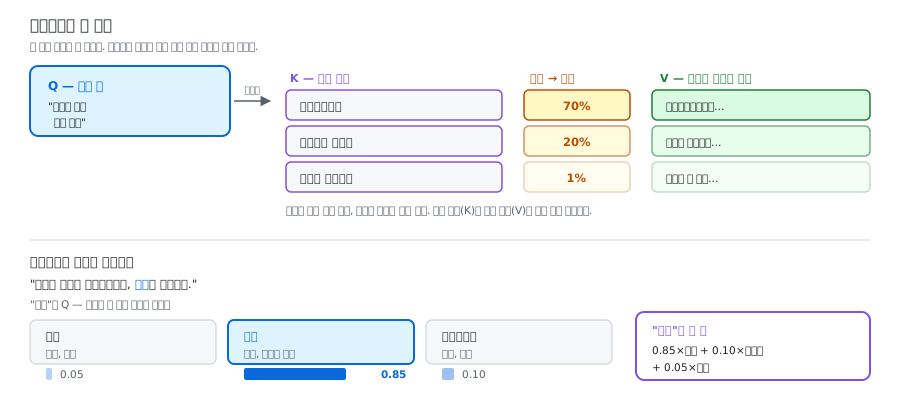
  <li>점수를 비율로 바꾼다 → 『공룡백과』 70%, 『파충류』 20%, 『요리책』 1%</li>
  <li>그 비율만큼 각 책의 <strong>내용(V)</strong>을 섞어서 가져온다</li>
</ol>

<p>3번이 바로 소프트맥스다.</p>

<p>그리고 여기서 중요한 게 하나 있다. <strong>한 권만 고르는 게 아니라 여러 권을 비율대로 섞는다.</strong> 공룡백과를 70%, 파충류 책을 20%만큼 겹쳐 읽는 셈이다.</p>

<p><strong>K와 V를 왜 나눠 놨을까?</strong> 책등 제목과 책 내용은 다르기 때문이다. 제목은 <strong>찾기 좋게</strong> 짧게 적혀 있고, 내용은 <strong>실제로 쓸모 있는</strong> 정보다. 찾는 용도(K)와 쓰는 용도(V)를 분리한 것이 이 구조의 핵심 아이디어다.</p>

<hr />

<h2 id="2-왜-필요한가">2. 왜 필요한가</h2>

<h3 id="무슨-문제를-푸는가">무슨 문제를 푸는가</h3>

<div class="language-plaintext highlighter-rouge"><div class="highlight"><pre class="highlight"><code>"민수가 사과를 떨어뜨렸는데, 그것이 굴러갔다."
</code></pre></div></div>

<p><strong>“그것”이 무엇인지</strong> 우리는 안다. 사과다. 민수가 굴러간 게 아니다.</p>

<p>그런데 컴퓨터에게 “그것”이라는 토큰은 그냥 숫자 뭉치다. 앞의 어떤 단어를 가리키는지 알 방법이 없다. 어텐션이 이 문제를 이렇게 푼다.</p>

<div class="language-plaintext highlighter-rouge"><div class="highlight"><pre class="highlight"><code>"그것"의 Q: "나는 앞의 명사 중 무언가를 가리키는 대명사야.
             굴러갈 수 있는 물체를 찾아."
                        ↓ 각 단어의 K와 비교
민수의 K:    "사람, 주어"             → 점수 낮음  (0.05)
사과의 K:    "물체, 둥글고 작음"       → 점수 높음  (0.85)
떨어뜨의 K:  "동사, 행위"             → 점수 낮음  (0.10)
                        ↓ 소프트맥스
"그것"의 새 임베딩 = 0.85×사과V + 0.10×떨어뜨V + 0.05×민수V
</code></pre></div></div>

<p><strong>“그것”의 벡터 안에 사과의 의미가 85% 섞여 들어간다. 문맥을 이해한다는 게 바로 이것이다.</strong></p>

<p>임베딩은 문맥 없는 기본 뜻이다. 어텐션을 거치면 그 숫자들이 <strong>문맥에 맞게 갱신</strong>된다. 그리고 이 과정이 수십 층 반복된다.</p>

<h3 id="셋-다-같은-곳에서-나온다">셋 다 같은 곳에서 나온다</h3>

<p>각 토큰의 임베딩 하나에 행렬 세 개를 곱해서 Q, K, V를 만든다.</p>

<div class="language-python highlighter-rouge"><div class="highlight"><pre class="highlight"><code><span class="n">Q</span> <span class="o">=</span> <span class="n">embedding</span> <span class="o">@</span> <span class="n">W_q</span>    <span class="c1"># (768,) × (768, 64) → (64,)
</span><span class="n">K</span> <span class="o">=</span> <span class="n">embedding</span> <span class="o">@</span> <span class="n">W_k</span>
<span class="n">V</span> <span class="o">=</span> <span class="n">embedding</span> <span class="o">@</span> <span class="n">W_v</span>
</code></pre></div></div>

<p>같은 단어에서 출발했는데 곱하는 행렬이 달라서 셋이 서로 다른 벡터가 된다. <strong>하나의 단어가 세 가지 역할을 동시에 맡는 것</strong>이다.</p>

<h3 id="계산은-네-줄이다">계산은 네 줄이다</h3>

<div class="language-plaintext highlighter-rouge"><div class="highlight"><pre class="highlight"><code>                    ┌   Q · Kᵀ   ┐
Attention = softmax │ ───────── │ · V
                    └    √d_k    ┘
</code></pre></div></div>

<table>
  <thead>
    <tr>
      <th>단계</th>
      <th>하는 일</th>
      <th>그릇 모양</th>
    </tr>
  </thead>
  <tbody>
    <tr>
      <td><code class="language-plaintext highlighter-rouge">Q · Kᵀ</code></td>
      <td>모든 단어쌍의 관련도 점수</td>
      <td>행렬 (n × n)</td>
    </tr>
    <tr>
      <td><code class="language-plaintext highlighter-rouge">÷ √d_k</code></td>
      <td>점수 크기 조절</td>
      <td>행렬 (n × n)</td>
    </tr>
    <tr>
      <td><code class="language-plaintext highlighter-rouge">softmax</code></td>
      <td>점수 → 확률 (각 행의 합 = 1)</td>
      <td>행렬 (n × n)</td>
    </tr>
    <tr>
      <td><code class="language-plaintext highlighter-rouge">× V</code></td>
      <td>확률만큼 내용물 섞기</td>
      <td>행렬 (n × d)</td>
    </tr>
  </tbody>
</table>

<div class="language-python highlighter-rouge"><div class="highlight"><pre class="highlight"><code><span class="k">def</span> <span class="nf">attention</span><span class="p">(</span><span class="n">Q</span><span class="p">,</span> <span class="n">K</span><span class="p">,</span> <span class="n">V</span><span class="p">):</span>
    <span class="n">d_k</span> <span class="o">=</span> <span class="n">K</span><span class="p">.</span><span class="n">shape</span><span class="p">[</span><span class="o">-</span><span class="mi">1</span><span class="p">]</span>
    <span class="n">scores</span> <span class="o">=</span> <span class="n">Q</span> <span class="o">@</span> <span class="n">K</span><span class="p">.</span><span class="n">T</span> <span class="o">/</span> <span class="n">np</span><span class="p">.</span><span class="n">sqrt</span><span class="p">(</span><span class="n">d_k</span><span class="p">)</span>   <span class="c1"># 점수 + 크기 조절
</span>    <span class="n">weights</span> <span class="o">=</span> <span class="n">softmax</span><span class="p">(</span><span class="n">scores</span><span class="p">)</span>          <span class="c1"># 확률로
</span>    <span class="k">return</span> <span class="n">weights</span> <span class="o">@</span> <span class="n">V</span>                 <span class="c1"># 비율대로 섞기
</span></code></pre></div></div>

<h3 id="d_k가-왜-있을까--스케일러의-원리"><code class="language-plaintext highlighter-rouge">÷√d_k</code>가 왜 있을까 — 스케일러의 원리</h3>

<p>임베딩 차원이 768이면 <code class="language-plaintext highlighter-rouge">Q·K</code> 값이 아주 커진다. 그 상태로 소프트맥스에 넣으면 이렇게 된다.</p>

<div class="language-plaintext highlighter-rouge"><div class="highlight"><pre class="highlight"><code>점수가 작을 때  [2, 1, 0.5]    → softmax → [0.6, 0.2, 0.1]   부드럽다
점수가 클 때    [20, 10, 5]    → softmax → [1.0, 0.0, 0.0]   한 곳만 본다
</code></pre></div></div>

<p>한 단어만 100% 보고 나머지를 완전히 무시하면 학습이 안 된다. 그래서 <code class="language-plaintext highlighter-rouge">√d_k</code>로 나눠 적당한 크기로 되돌린다.</p>

<p><strong>숫자들의 크기를 맞춰 주는 이 작업이 스케일러가 하는 일과 같은 원리다.</strong> 이 방식의 정식 이름이 Scaled Dot-Product Attention인 이유가 여기 있다.</p>

<h3 id="kv-캐시--에이전트-비용의-핵심">KV 캐시 — 에이전트 비용의 핵심</h3>

<p>하네스 루프를 돌 때마다 대화 전체를 처음부터 다시 보낸다. 그런데 <strong>이미 계산한 K와 V는 바뀌지 않는다.</strong> 그래서 저장해 두고 재사용한다. 이게 <strong>KV 캐시</strong>다.</p>

<div class="language-plaintext highlighter-rouge"><div class="highlight"><pre class="highlight"><code>1번째 턴:  [시스템 프롬프트 + 도구 설명]  → K,V 계산 (비싸다)
2번째 턴:  [같은 앞부분] + 새 질문
           └─ 캐시에서 꺼내 쓴다 ─┘   └ 이것만 계산
</code></pre></div></div>

<p>API의 <strong>프롬프트 캐싱</strong> 기능이 바로 이것이다. 여기서 실무 요령이 하나 나온다.</p>

<blockquote>
  <p>프롬프트를 짤 때 <strong>안 바뀌는 것을 앞에, 바뀌는 것을 뒤에</strong> 둔다. 앞부분이 고정돼야 캐시가 먹힌다.</p>
</blockquote>

<h3 id="컨텍스트가-길수록-왜-비싼가--n-문제">컨텍스트가 길수록 왜 비싼가 — n² 문제</h3>

<p><code class="language-plaintext highlighter-rouge">Q · Kᵀ</code>는 <strong>모든 단어가 모든 단어와 짝지어 비교</strong>하는 계산이다.</p>

<div class="language-plaintext highlighter-rouge"><div class="highlight"><pre class="highlight"><code>토큰 1,000개  →  100만 번 비교
토큰 2,000개  →  400만 번 비교   (2배가 아니라 4배)
토큰 10,000개 →  1억 번 비교
</code></pre></div></div>

<p>컨텍스트를 2배 늘리면 계산은 <strong>4배</strong>가 된다. 긴 컨텍스트가 비싸고 느린 근본 이유이고, 컨텍스트 관리가 에이전트 개발의 핵심 과제인 이유다.</p>

<h3 id="멀티헤드-어텐션">멀티헤드 어텐션</h3>

<p>Q/K/V를 한 세트만 쓰지 않고 여러 세트를 동시에 돌린다. 보통 12~96개다.</p>

<div class="language-plaintext highlighter-rouge"><div class="highlight"><pre class="highlight"><code>헤드 1: 문법 관계에 주목 (주어-동사)
헤드 2: 대명사가 가리키는 대상에 주목
헤드 3: 멀리 떨어진 단어 관계에 주목
  ...
→ 전부 이어붙여서 사용
</code></pre></div></div>

<p>한 명이 책을 찾는 게 아니라 <strong>사서 여러 명이 각자 다른 기준으로 찾아와 합치는 것</strong>과 같다.</p>

<hr />

<h2 id="3-어디서-만났나">3. 어디서 만났나</h2>

<p>이 용어는 수업에서 정식으로 다루기 전에 따로 정리한 것이다.</p>

<p>다만 <strong>7회차</strong>에서 “컨텍스트가 길면 왜 비싼가”라는 질문을 만났는데, 그 답이 위의 n² 문제다. 토큰을 줄이라는 조언의 바닥에 이 계산이 있었다.</p>

<p><a href="/blog/2026/09/07/agent-mcp-skill/">7회차 — 에이전트, MCP, 스킬 — 범용 AI를 내 전용 조수로</a></p>

<p><strong>6회차</strong>의 데이터베이스와도 이어진다. <code class="language-plaintext highlighter-rouge">WHERE user = '민수'</code>가 Q/K/V의 조상 격이기 때문인데, 아래 4번에서 이어서 본다.</p>

<p><a href="/blog/2026/09/04/database-sql-backup/">6회차 — 데이터베이스, 서비스의 기억을 어디에 어떤 모양으로 둘까</a></p>

<hr />

<h2 id="4-헷갈리는-개념">4. 헷갈리는 개념</h2>

<table>
  <thead>
    <tr>
      <th>이 용어</th>
      <th>비슷하지만 다른 것</th>
      <th>차이</th>
    </tr>
  </thead>
  <tbody>
    <tr>
      <td>Q/K/V</td>
      <td><strong>어텐션</strong></td>
      <td>어텐션은 <strong>구조의 이름</strong>, Q/K/V는 그 구조를 이루는 <strong>세 벡터</strong>다</td>
    </tr>
    <tr>
      <td>Q/K/V</td>
      <td><strong>트랜스포머</strong></td>
      <td>더 위층이다. 트랜스포머 ⊃ 어텐션 ⊃ Q/K/V. 트랜스포머는 어텐션을 여러 층 쌓아 만든 모델 구조 전체를 가리킨다</td>
    </tr>
    <tr>
      <td>어텐션</td>
      <td>RAG 검색</td>
      <td>어텐션은 모델 <strong>안</strong>, RAG는 모델 <strong>밖</strong>. 아래 5번에서 자세히</td>
    </tr>
    <tr>
      <td>Q/K/V</td>
      <td>DB의 Key-Value</td>
      <td>이름이 여기서 왔다. DB는 <strong>정확히 일치하는 행만</strong> 가져오고, 어텐션은 <strong>모든 행을 비율대로 섞는다</strong></td>
    </tr>
  </tbody>
</table>

<p>이름의 뿌리가 데이터베이스라는 게 재미있다. <code class="language-plaintext highlighter-rouge">WHERE user = '민수'</code>를 보면 검색 조건 <code class="language-plaintext highlighter-rouge">'민수'</code>가 Q, 열 <code class="language-plaintext highlighter-rouge">user</code>가 K, 열 <code class="language-plaintext highlighter-rouge">fact</code>가 V에 해당한다. <strong>어텐션은 말랑말랑한 데이터베이스 조회</strong>인 셈이다. DB는 맞거나 안 맞거나 둘 중 하나지만, 어텐션은 “85% 맞음”이 가능하다.</p>

<hr />

<h2 id="5-많이들-오해하는-지점">5. 많이들 오해하는 지점</h2>

<p><strong>ㄱ. “어텐션이 가장 관련 있는 단어 하나를 골라낸다”</strong></p>

<p>고르지 않는다. <strong>전부를 비율대로 섞는다.</strong></p>

<p>도서관 비유로 돌아가면, 한 권만 빌려 오는 게 아니라 공룡백과 70% + 파충류책 20% + 나머지를 겹쳐 읽는 것이다. “그것”의 경우도 사과만 가져온 게 아니라 0.85×사과 + 0.10×떨어뜨 + 0.05×민수를 섞었다.</p>

<p>이 차이가 중요한 이유는, 그래서 <strong>애매한 문맥도 처리할 수 있기</strong> 때문이다. 하나만 골랐다면 애매할 때 틀릴 수밖에 없다.</p>

<p><strong>ㄴ. “어텐션이랑 RAG 검색이 결국 같은 것 아닌가”</strong></p>

<p>둘 다 “관련 있는 걸 찾아온다”라서 헷갈리는데, 층이 완전히 다르다.</p>

<table>
  <thead>
    <tr>
      <th> </th>
      <th>RAG 검색</th>
      <th>어텐션</th>
    </tr>
  </thead>
  <tbody>
    <tr>
      <td>어디서</td>
      <td>모델 <strong>밖</strong> (내 코드)</td>
      <td>모델 <strong>안</strong> (매 층마다)</td>
    </tr>
    <tr>
      <td>대상</td>
      <td>문서 수천 개</td>
      <td>지금 문맥의 토큰들</td>
    </tr>
    <tr>
      <td>결과</td>
      <td>상위 3개만 골라온다</td>
      <td>전부를 비율대로 섞는다</td>
    </tr>
    <tr>
      <td>누가 짜나</td>
      <td>내가 짠다</td>
      <td>학습으로 저절로</td>
    </tr>
  </tbody>
</table>

<p><strong>어텐션은 모델 안의 검색, RAG는 모델 밖의 검색</strong>이라고 보면 된다.</p>

<p><strong>ㄷ. “Q, K, V가 각각 다른 데이터다”</strong></p>

<p>세 글자로 나뉘어 있으니 서로 다른 데서 온 것처럼 보인다. 그렇지 않다. <strong>셋 다 같은 단어의 임베딩 하나에서 나온다.</strong> 곱하는 행렬(<code class="language-plaintext highlighter-rouge">W_q</code>, <code class="language-plaintext highlighter-rouge">W_k</code>, <code class="language-plaintext highlighter-rouge">W_v</code>)만 다를 뿐이다.</p>

<p>한 사람이 상황에 따라 “찾는 사람 · 이름표 · 내용물” 세 역할을 동시에 맡는다고 생각하면 된다. 문장 안의 모든 단어가 각자 이 셋을 전부 갖고 있고, 서로를 훑는다.</p>

<hr />

<h2 id="6-관련-용어">6. 관련 용어</h2>

<p>어텐션 · 트랜스포머 · <a class="term-link" href="/blog/2026/09/13/term-embedding/">임베딩</a> · <a class="term-link" href="/blog/2026/09/13/term-softmax/">소프트맥스</a> · <a class="term-link" href="/blog/2026/09/07/term-token/">토큰</a> · <a class="term-link" href="/blog/2026/09/13/term-vector/">벡터</a> · <a class="term-link" href="/blog/2026/09/13/term-matrix/">행렬</a> · <a class="term-link" href="/blog/2026/09/04/term-sqlite/">SQLite</a></p>]]></content><author><name>김송이</name></author><category term="glossary" /><category term="AI기초" /><category term="QKV" /><category term="어텐션" /><category term="트랜스포머" /><category term="KV캐시" /><summary type="html"><![CDATA[]]></summary></entry><entry><title type="html">루트</title><link href="https://songyee-ai.github.io/blog/2026/09/13/term-root/" rel="alternate" type="text/html" title="루트" /><published>2026-09-13T00:00:00+09:00</published><updated>2026-09-13T00:00:00+09:00</updated><id>https://songyee-ai.github.io/blog/2026/09/13/term-root</id><content type="html" xml:base="https://songyee-ai.github.io/blog/2026/09/13/term-root/"><![CDATA[<!-- TODO: 회차 확정 — 수업에서 루트/경로를 정식으로 다루는 리뷰 글이 올라오면 lesson 값과 3번 섹션을 갱신할 것 -->

<h2 id="한-줄-정의">한 줄 정의</h2>

<blockquote>
  <p>더 위로 올라갈 수 없는 가장 처음 자리</p>
</blockquote>

<hr />

<h2 id="1-비유로-이해하기">1. 비유로 이해하기</h2>

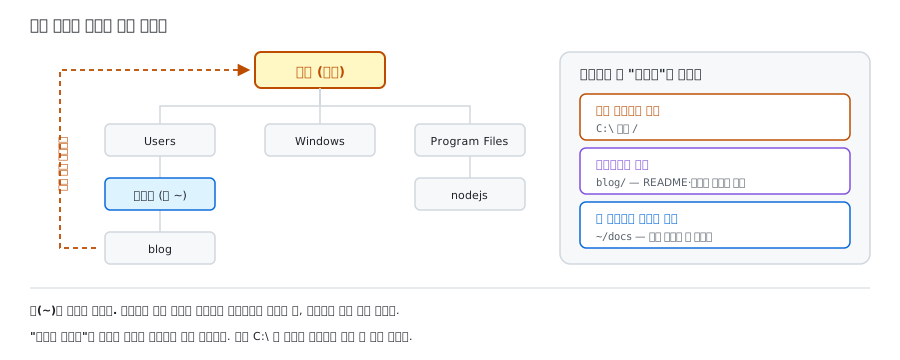
<p>나무를 거꾸로 뒤집어 보면 된다. 컴퓨터의 폴더 구조가 딱 그 모양이다.</p>

<figure class="post-figure">
  <img src="/blog/assets/images/term-root/upside-down-tree.svg" alt="폴더 구조는 거꾸로 뒤집힌 나무 모양이고, 어느 파일에서 위로 올라가도 결국 루트에 닿는다" loading="lazy" />
  <figcaption>그림 1. 어디서 출발해도 위로 올라가면 결국 한 자리에 닿는다</figcaption>
</figure>

<p><strong>어느 파일에서 출발해도 계속 위로 올라가면 결국 루트에 도착</strong>하고, 거기서는 더 올라갈 곳이 없다. 뿌리니까.</p>

<hr />

<h2 id="2-왜-필요한가">2. 왜 필요한가</h2>

<h3 id="루트-디렉터리--경로의-기준점">루트 디렉터리 — 경로의 기준점</h3>

<p>파일 시스템의 최상단이다. 표기는 운영체제마다 다르다.</p>

<table>
  <thead>
    <tr>
      <th>환경</th>
      <th>루트 표기</th>
    </tr>
  </thead>
  <tbody>
    <tr>
      <td>Windows</td>
      <td><code class="language-plaintext highlighter-rouge">C:\</code></td>
    </tr>
    <tr>
      <td>Linux · macOS</td>
      <td><code class="language-plaintext highlighter-rouge">/</code></td>
    </tr>
    <tr>
      <td>프로젝트 기준</td>
      <td>그 프로젝트 폴더 자체</td>
    </tr>
  </tbody>
</table>

<p>이게 중요한 이유는 <strong>경로를 읽는 기준이 되기 때문</strong>이다. <code class="language-plaintext highlighter-rouge">/home/user/a.txt</code>처럼 루트부터 전부 쓴 주소가 절대 경로이고, <code class="language-plaintext highlighter-rouge">./a.txt</code>처럼 지금 서 있는 자리를 기준으로 쓴 주소가 상대 경로다.</p>

<p>에이전트에게 파일 도구를 줄 때도 기준선이 된다. <strong>“어디부터 어디까지 건드릴 수 있는가”</strong>가 루트로 정해진다.</p>

<div class="language-python highlighter-rouge"><div class="highlight"><pre class="highlight"><code><span class="c1"># 위험: 컴퓨터 전체를 뒤질 수 있다
</span><span class="n">allowed_root</span> <span class="o">=</span> <span class="s">"/"</span>

<span class="c1"># 안전: 이 폴더 밖으로는 못 나간다
</span><span class="n">allowed_root</span> <span class="o">=</span> <span class="s">"/home/user/project"</span>
</code></pre></div></div>

<p>MCP 파일 서버를 실행할 때 폴더를 인자로 넘기는 이유가 이것이다. 그 폴더가 그 서버의 루트가 된다.</p>

<div class="language-bash highlighter-rouge"><div class="highlight"><pre class="highlight"><code>npx @modelcontextprotocol/server-filesystem ~/docs
<span class="c">#                                            └─ 이 서버의 루트</span>
</code></pre></div></div>

<h3 id="설정-파일이-루트에-모이는-이유">설정 파일이 루트에 모이는 이유</h3>

<p>에이전트 프로젝트의 전형적인 폴더 구조다.</p>

<div class="language-plaintext highlighter-rouge"><div class="highlight"><pre class="highlight"><code>my-agent/                 ← 프로젝트 루트
├── README.md             ← 설명 (대문 안내판)
├── .gitignore            ← 올리지 말 파일 목록
├── .env                  ← API 키 (절대 커밋 금지)
├── src/
│   ├── harness.py
│   └── tools.py
└── data/
    └── memory.db         ← SQLite 기억 파일
</code></pre></div></div>

<p><strong>설정 파일이 전부 루트에 모여 있다.</strong> 우연이 아니다. 프로그램들이 “이 프로젝트의 설정은 루트에 있겠지” 하고 그 자리를 찾기 때문이다. <code class="language-plaintext highlighter-rouge">.gitignore</code>를 <code class="language-plaintext highlighter-rouge">src/</code> 안에 넣으면 git이 못 찾는다.</p>

<p>저장소의 <code class="language-plaintext highlighter-rouge">README.md</code>를 루트에 두는 것도 같은 이유다. <strong>누가 저장소에 처음 들어오면 무조건 거치는 자리</strong>라서, 대문에 붙인 안내판이 되는 것이다.</p>

<h3 id="루트-사용자--뭐든-할-수-있는-계정">루트 사용자 — 뭐든 할 수 있는 계정</h3>

<p>컴퓨터에서 <strong>최고 권한을 가진 계정</strong>을 루트 사용자라고 한다. 리눅스에서 명령 앞에 <code class="language-plaintext highlighter-rouge">sudo</code>를 붙이는 건 “잠깐 최고 권한으로 하겠습니다”라는 뜻이다.</p>

<p>에이전트에게 명령 실행 도구를 줄 때는 <strong>절대 루트 권한으로 돌리지 않는 게 원칙</strong>이다. 모델이 판단을 잘못하면 되돌릴 수 없는 일이 벌어질 수 있기 때문이다.</p>

<h3 id="루트-원인--증상이-아니라-뿌리">루트 원인 — 증상이 아니라 뿌리</h3>

<p>문제의 <strong>진짜 원인</strong>을 뜻한다. 눈에 보이는 증상이 아니라, 계속 “왜?”를 타고 내려가면 나오는 자리다.</p>

<div class="language-plaintext highlighter-rouge"><div class="highlight"><pre class="highlight"><code>증상: 에이전트가 엉뚱한 답을 한다
  ↓ 왜?
검색 도구가 관련 없는 문서를 가져온다
  ↓ 왜?
모델이 검색어를 너무 짧게 만든다
  ↓ 왜?
도구 스키마의 설명이 부실하다        ← 루트 원인
</code></pre></div></div>

<hr />

<h2 id="3-어디서-만났나">3. 어디서 만났나</h2>

<p>이 용어 자체는 수업에서 정식으로 다루기 전에 따로 정리한 것이다. 다만 루트가 무엇인지 알아야 넘어갈 수 있는 자리는 이미 두 번 있었다.</p>

<p><strong>2회차</strong>에서 블로그 저장소를 만들고 그 폴더에서 작업을 시작했다. 그 폴더가 바로 프로젝트 루트였고, <code class="language-plaintext highlighter-rouge">README.md</code>와 설정 파일이 거기 놓였다.</p>

<p><a href="/blog/2026/08/31/git-review-node-setup/">2회차 — Git·GitHub 복습과 바이브 코딩 작업대 만들기</a></p>

<p><strong>3회차</strong>에서 PATH를 배우며 “경로”라는 개념을 처음 다뤘다. 운영체제가 실행 파일을 찾아 다니는 그 주소들이 전부 루트에서 출발한다.</p>

<p><a href="/blog/2026/09/01/path-process-thread/">3회차 — PATH, 프로세스와 스레드, 그리고 동기·비동기</a></p>

<hr />

<h2 id="4-헷갈리는-개념">4. 헷갈리는 개념</h2>

<table>
  <thead>
    <tr>
      <th>이 용어</th>
      <th>비슷하지만 다른 것</th>
      <th>차이</th>
    </tr>
  </thead>
  <tbody>
    <tr>
      <td>루트</td>
      <td>홈 디렉터리 (<code class="language-plaintext highlighter-rouge">~</code>)</td>
      <td>홈은 <strong>내 개인 폴더</strong>다. 루트 한참 아래에 있다</td>
    </tr>
    <tr>
      <td>루트</td>
      <td>워킹 디렉터리</td>
      <td>워킹 디렉터리는 <strong>지금 내가 서 있는 폴더</strong>. 명령을 치면 여기가 기준이 된다</td>
    </tr>
    <tr>
      <td>절대 경로</td>
      <td>상대 경로</td>
      <td>절대 경로는 루트부터 다 쓴 주소(<code class="language-plaintext highlighter-rouge">/home/user/a.txt</code>), 상대 경로는 지금 위치 기준(<code class="language-plaintext highlighter-rouge">./a.txt</code>, <code class="language-plaintext highlighter-rouge">../b.txt</code>)</td>
    </tr>
    <tr>
      <td>루트 (root)</td>
      <td>라우트 (route)</td>
      <td>전혀 다른 영어 단어. route는 <strong>경로·노선</strong>을 뜻하고, 에이전트 분야에서는 “어느 모델에게 질문을 보낼까”를 정하는 라우팅으로 쓰인다</td>
    </tr>
  </tbody>
</table>

<hr />

<h2 id="5-많이들-오해하는-지점">5. 많이들 오해하는 지점</h2>

<p><strong>ㄱ. “루트 = C 드라이브”</strong></p>

<p>윈도우를 쓰면 이렇게 굳기 쉽다. 하지만 루트에는 늘 <strong>“무엇의”</strong>가 붙는다. 프로젝트 루트도 루트고, MCP 파일 서버에 넘겨준 <code class="language-plaintext highlighter-rouge">~/docs</code>도 그 서버의 루트다. <code class="language-plaintext highlighter-rouge">C:\</code>는 <strong>파일 시스템 전체의</strong> 루트일 뿐이다.</p>

<p>그래서 누가 “루트에 두세요”라고 하면 <strong>무엇의 루트인지 먼저 물어봐야 한다.</strong> 대개는 프로젝트 폴더 맨 위를 말하는 것이지, <code class="language-plaintext highlighter-rouge">C:\</code>에 파일을 놓으라는 뜻이 아니다.</p>

<p><strong>ㄴ. “루트 = 내 문서 같은 홈 폴더”</strong></p>

<p>홈(<code class="language-plaintext highlighter-rouge">~</code>)은 루트가 아니다. 윈도우에서 <code class="language-plaintext highlighter-rouge">C:\Users\내이름</code>, 맥에서 <code class="language-plaintext highlighter-rouge">/Users/내이름</code>처럼 <strong>루트 한참 아래에 있는 내 개인 폴더</strong>다. 컴퓨터를 켜면 보통 여기서 시작하니까 여기가 꼭대기처럼 느껴지는 것뿐이다.</p>

<p><strong>ㄷ. 한국어 “루트”가 사실 세 단어다</strong></p>

<table>
  <thead>
    <tr>
      <th>한글</th>
      <th>영어</th>
      <th>뜻</th>
    </tr>
  </thead>
  <tbody>
    <tr>
      <td>루트</td>
      <td><strong>root</strong></td>
      <td>뿌리, 최상단</td>
    </tr>
    <tr>
      <td>루트 (라우트)</td>
      <td><strong>route</strong></td>
      <td>경로, 노선</td>
    </tr>
    <tr>
      <td>루트</td>
      <td><strong>√</strong></td>
      <td>제곱근</td>
    </tr>
  </tbody>
</table>

<p>그래서 “루트 경로”라는 말은 그 자체로 모호하다. 개발 문맥에서 그냥 “루트”라고 하면 대개 root(최상단)이고, 경로를 뜻할 때는 보통 <strong>“라우트 / 라우팅”</strong>이라고 구분해서 쓴다.</p>

<hr />

<h2 id="6-관련-용어">6. 관련 용어</h2>

<p><a class="term-link" href="/blog/2026/09/09/term-path/">PATH</a> · <a class="term-link" href="/blog/2026/08/31/term-cli/">CLI</a> · 저장소 · <a class="term-link" href="/blog/2026/09/13/term-gate/">게이트</a> · <a class="term-link" href="/blog/2026/09/07/term-mcp/">MCP</a> · 절대 경로</p>]]></content><author><name>김송이</name></author><category term="glossary" /><category term="개발환경" /><category term="루트" /><category term="디렉터리" /><category term="경로" /><category term="권한" /><summary type="html"><![CDATA[]]></summary></entry><entry><title type="html">스칼라</title><link href="https://songyee-ai.github.io/blog/2026/09/13/term-scalar/" rel="alternate" type="text/html" title="스칼라" /><published>2026-09-13T00:00:00+09:00</published><updated>2026-09-13T00:00:00+09:00</updated><id>https://songyee-ai.github.io/blog/2026/09/13/term-scalar</id><content type="html" xml:base="https://songyee-ai.github.io/blog/2026/09/13/term-scalar/"><![CDATA[<!-- TODO: 회차 확정 — 수업에서 이 개념을 다루는 리뷰 글이 올라오면 lesson 값과 3번 섹션을 갱신할 것 -->

<h2 id="한-줄-정의">한 줄 정의</h2>

<blockquote>
  <p>숫자 하나. 차원이 없는 값</p>
</blockquote>

<hr />

<h2 id="1-비유로-이해하기">1. 비유로 이해하기</h2>

<p>숫자를 담는 그릇을 아파트로 생각하면 맞아떨어진다. 스칼라는 <strong>방 하나</strong>다.</p>

<figure class="post-figure">
  <img src="/blog/assets/images/term-scalar/apartment-scalar.svg" alt="숫자를 담는 그릇 네 가지 중 스칼라는 방 하나에 해당하는 0차원이다" loading="lazy" />
  <figcaption>그림 1. 방 하나. 주소를 댈 필요가 없다</figcaption>
</figure>

<p>몇 동 몇 층 몇 호인지 댈 필요가 없다. 그냥 <strong>그거 하나</strong>다. 주소를 대는 데 필요한 정보가 <strong>0개</strong>라서 스칼라를 0차원이라고 부른다.</p>

<p>온도가 <code class="language-plaintext highlighter-rouge">23</code>, 확률이 <code class="language-plaintext highlighter-rouge">0.95</code>. 이런 값들이 스칼라다.</p>

<hr />

<h2 id="2-왜-필요한가">2. 왜 필요한가</h2>

<h3 id="숫자-하나에-왜-이름까지-붙였을까">숫자 하나에 왜 이름까지 붙였을까</h3>

<p>“숫자 하나”라는 말이면 충분할 것 같은데 굳이 이름이 붙은 이유가 있다. <strong>값이 하나인지 여러 개인지에 따라 계산의 모양이 완전히 달라지기 때문</strong>이다.</p>

<p>숫자 하나를 벡터에 곱하는 것과 벡터를 벡터에 곱하는 것은 전혀 다른 연산이다. 그래서 “이 값은 하나짜리”라는 걸 분명히 해 두어야 한다. 스칼라는 <strong>0차원이라는 자리</strong>를 차지하는 이름이다.</p>

<h3 id="실제로-만나는-스칼라들">실제로 만나는 스칼라들</h3>

<table>
  <thead>
    <tr>
      <th>무엇</th>
      <th>왜 스칼라인가</th>
    </tr>
  </thead>
  <tbody>
    <tr>
      <td><strong>온도(temperature)</strong></td>
      <td>답변의 무작위성을 조절하는 값 하나</td>
    </tr>
    <tr>
      <td><strong>학습률</strong></td>
      <td>모델이 한 번에 얼마나 고칠지 정하는 값 하나</td>
    </tr>
    <tr>
      <td><strong>손실값(loss)</strong></td>
      <td>지금 얼마나 틀렸는지를 나타내는 값 하나</td>
    </tr>
    <tr>
      <td><strong>확률 하나</strong></td>
      <td><code class="language-plaintext highlighter-rouge">0.87</code> 같은 값</td>
    </tr>
    <tr>
      <td><strong>토큰 ID 하나</strong></td>
      <td><code class="language-plaintext highlighter-rouge">14523</code> 처럼 토큰을 가리키는 번호</td>
    </tr>
  </tbody>
</table>

<h3 id="llm이-내놓는-마지막-값이-스칼라다">LLM이 내놓는 마지막 값이 스칼라다</h3>

<p>이게 스칼라를 기억해야 하는 가장 좋은 이유다.</p>

<p>LLM은 다음에 올 단어를 고를 때, 사전에 있는 모든 단어(10만 개쯤)에 점수를 매긴다. 그 점수 뭉치는 숫자 10만 개짜리 <strong>벡터</strong>다. 그걸 확률로 바꿔도 여전히 10만 개짜리 벡터다.</p>

<p>그런데 <strong>최종 출력은 거기서 하나를 고른 값</strong>이다. 숫자 하나. 스칼라.</p>

<div class="language-plaintext highlighter-rouge"><div class="highlight"><pre class="highlight"><code>숫자 10만 개 (벡터)  ──하나 고르기──▶  14523 (스칼라)
                                        └─ "좋은" 이라는 토큰
</code></pre></div></div>

<p>그 스칼라 하나가 글자로 바뀌어 화면에 찍힌다. <strong>우리가 읽는 AI의 답변은 스칼라를 하나씩 이어붙인 것</strong>이다.</p>

<hr />

<h2 id="3-어디서-만났나">3. 어디서 만났나</h2>

<p>이 용어는 수업에서 정식으로 다루기 전에 따로 정리한 것이다.</p>

<p>다만 <strong>7회차</strong>에서 토큰과 컨텍스트를 배울 때 이미 마주친 개념이었다. 토큰 하나는 결국 번호 하나이고, 그 번호가 스칼라다. “토큰 수”를 세는 일도 값 하나를 다루는 일이다.</p>

<p><a href="/blog/2026/09/07/agent-mcp-skill/">7회차 — 에이전트, MCP, 스킬 — 범용 AI를 내 전용 조수로</a></p>

<hr />

<h2 id="4-헷갈리는-개념">4. 헷갈리는 개념</h2>

<table>
  <thead>
    <tr>
      <th>이 용어</th>
      <th>비슷하지만 다른 것</th>
      <th>차이</th>
    </tr>
  </thead>
  <tbody>
    <tr>
      <td>스칼라 (Scalar)</td>
      <td><strong>스케일러 (Scaler)</strong></td>
      <td>발음이 거의 같은데 전혀 다르다. 스칼라는 <strong>숫자 하나</strong>, 스케일러는 숫자들의 <strong>크기를 맞춰 주는 도구</strong>다</td>
    </tr>
    <tr>
      <td>스칼라</td>
      <td>벡터</td>
      <td>벡터는 숫자를 한 줄로 늘어놓은 것. 스칼라는 그중 하나</td>
    </tr>
    <tr>
      <td>스칼라</td>
      <td>상수</td>
      <td>상수는 “변하지 않는 값”이라는 뜻. 스칼라는 “값이 하나”라는 뜻. 변하는 스칼라도 많다(손실값은 매 단계 바뀐다)</td>
    </tr>
    <tr>
      <td>스칼라</td>
      <td>0차원 텐서</td>
      <td>같은 말이다. 딥러닝 코드에서는 스칼라도 텐서로 취급한다</td>
    </tr>
  </tbody>
</table>

<hr />

<h2 id="5-많이들-오해하는-지점">5. 많이들 오해하는 지점</h2>

<p><strong>ㄱ. “스칼라랑 스케일러는 같은 말 아닌가”</strong></p>

<p>한국어로 쓰면 거의 같게 들려서 정말 자주 섞인다. 전혀 다른 물건이다.</p>

<table>
  <thead>
    <tr>
      <th> </th>
      <th>스칼라 (Scalar)</th>
      <th>스케일러 (Scaler)</th>
    </tr>
  </thead>
  <tbody>
    <tr>
      <td>정체</td>
      <td>숫자 하나 — <strong>그릇의 모양</strong></td>
      <td>크기를 맞춰 주는 <strong>도구</strong></td>
    </tr>
    <tr>
      <td>비유</td>
      <td>방 하나</td>
      <td>다들 같은 기준으로 키를 재는 자</td>
    </tr>
    <tr>
      <td>예</td>
      <td><code class="language-plaintext highlighter-rouge">23</code>, <code class="language-plaintext highlighter-rouge">0.95</code></td>
      <td><code class="language-plaintext highlighter-rouge">StandardScaler</code>, <code class="language-plaintext highlighter-rouge">MinMaxScaler</code></td>
    </tr>
  </tbody>
</table>

<p>스케일러가 하는 일은 이렇다. 데이터에 나이(0~100)와 연봉(0~1억)이 섞여 있으면, 연봉 숫자가 너무 커서 모델이 나이를 거의 무시해 버린다. 그래서 둘을 비슷한 범위로 줄여 주는 게 스케일러다. 이걸 <strong>정규화(normalization)</strong>라고 한다.</p>

<div class="language-python highlighter-rouge"><div class="highlight"><pre class="highlight"><code><span class="kn">from</span> <span class="nn">sklearn.preprocessing</span> <span class="kn">import</span> <span class="n">StandardScaler</span>
<span class="n">scaler</span> <span class="o">=</span> <span class="n">StandardScaler</span><span class="p">()</span>
<span class="n">X</span> <span class="o">=</span> <span class="n">scaler</span><span class="p">.</span><span class="n">fit_transform</span><span class="p">(</span><span class="n">X</span><span class="p">)</span>   <span class="c1"># 모든 열을 평균 0, 표준편차 1로
</span></code></pre></div></div>

<p>손글씨 이미지의 픽셀 값 0~255를 0~1로 나누는 것도 같은 작업이다.</p>

<p><strong>ㄴ. “숫자 하나에 이름까지 붙일 필요가 있나”</strong></p>

<p>필요하다. 코드에서 “이건 값 하나야”를 명시하지 않으면 모양이 안 맞아서 에러가 난다. 딥러닝 에러의 상당수가 이런 모양 문제다. 스칼라는 그 체계의 맨 아래 칸이다.</p>

<p><strong>ㄷ. “스칼라는 정수를 말하는 것”</strong></p>

<p><code class="language-plaintext highlighter-rouge">23</code>도 <code class="language-plaintext highlighter-rouge">0.95</code>도 <code class="language-plaintext highlighter-rouge">-1.7</code>도 전부 스칼라다. <strong>정수냐 실수냐가 아니라 몇 개냐</strong>의 문제다. 숫자가 하나면 종류가 뭐든 스칼라다.</p>

<hr />

<h2 id="6-관련-용어">6. 관련 용어</h2>

<p><a class="term-link" href="/blog/2026/09/13/term-vector/">벡터</a> · <a class="term-link" href="/blog/2026/09/13/term-matrix/">행렬</a> · <a class="term-link" href="/blog/2026/09/13/term-tensor/">텐서</a> · <a class="term-link" href="/blog/2026/09/13/term-softmax/">소프트맥스</a> · <a class="term-link" href="/blog/2026/09/07/term-token/">토큰</a></p>]]></content><author><name>김송이</name></author><category term="glossary" /><category term="AI기초" /><category term="스칼라" /><category term="텐서" /><category term="차원" /><summary type="html"><![CDATA[]]></summary></entry><entry><title type="html">소프트맥스</title><link href="https://songyee-ai.github.io/blog/2026/09/13/term-softmax/" rel="alternate" type="text/html" title="소프트맥스" /><published>2026-09-13T00:00:00+09:00</published><updated>2026-09-13T00:00:00+09:00</updated><id>https://songyee-ai.github.io/blog/2026/09/13/term-softmax</id><content type="html" xml:base="https://songyee-ai.github.io/blog/2026/09/13/term-softmax/"><![CDATA[<!-- TODO: 회차 확정 — 수업에서 이 개념을 다루는 리뷰 글이 올라오면 lesson 값과 3번 섹션을 갱신할 것 -->

<h2 id="한-줄-정의">한 줄 정의</h2>

<blockquote>
  <p>숫자 여러 개를 다 더하면 1이 되는 확률로 바꾸는 계산</p>
</blockquote>

<hr />

<h2 id="1-비유로-이해하기">1. 비유로 이해하기</h2>

<p>반장 선거를 생각해 보자. 개표하니 이렇게 나왔다.</p>

<div class="language-plaintext highlighter-rouge"><div class="highlight"><pre class="highlight"><code>민수 20표,  영희 8표,  철수 2표
</code></pre></div></div>

<p>여기서 “민수가 뽑힐 확률”을 말하려면 백분율로 바꿔야 한다. 전체 30표로 나누면 67% · 27% · 7%다. <strong>개수를 비율로 바꾸는 이 작업</strong>이 소프트맥스가 하는 일이다.</p>

<figure class="post-figure">
  <img src="/blog/assets/images/term-softmax/logit-to-prob.svg" alt="로짓이라는 원점수를 지수 함수로 양수화하고 전체 합으로 나누면 확률이 되며, 온도를 낮추면 격차가 벌어지고 높이면 격차가 좁아진다" loading="lazy" />
  <figcaption>그림 1. 점수를 확률로. 온도는 그 격차를 조절하는 숫자 하나다</figcaption>
</figure>

<hr />

<h2 id="2-왜-필요한가">2. 왜 필요한가</h2>

<h3 id="그냥-나누기와-뭐가-다른가">그냥 나누기와 뭐가 다른가</h3>

<p>두 가지가 다르다.</p>

<p><strong>① 음수도 처리한다.</strong> AI가 내놓는 점수는 <code class="language-plaintext highlighter-rouge">-3.2</code>처럼 음수일 수 있다. 득표수로는 -3표가 말이 안 된다. 그래서 나누기 전에 모든 숫자를 <code class="language-plaintext highlighter-rouge">exp</code>(지수 함수)에 넣어 <strong>무조건 양수로 만든다.</strong></p>

<p><strong>② 1등을 더 밀어준다.</strong> 이게 이름의 soft-<strong>max</strong>다. 그냥 나누기만 하면 격차가 그대로지만, <code class="language-plaintext highlighter-rouge">exp</code>를 거치면 격차가 더 벌어진다.</p>

<div class="language-plaintext highlighter-rouge"><div class="highlight"><pre class="highlight"><code>하드맥스:   [100%,  0%,  0%]   ← 1등만 살린다 (너무 딱딱하다)
소프트맥스: [ 66%, 24%, 10%]   ← 1등을 밀어주되 나머지도 살린다
그냥 비율:  [ 65%, 32%,  3%]   ← 격차 반영이 약하다
</code></pre></div></div>

<p><strong>“1등만 100%”와 “그냥 비율”의 중간 지점</strong>이라서 소프트맥스라는 이름이 붙었다.</p>

<h3 id="llm이-글을-쓰는-원리가-이것이다">LLM이 글을 쓰는 원리가 이것이다</h3>

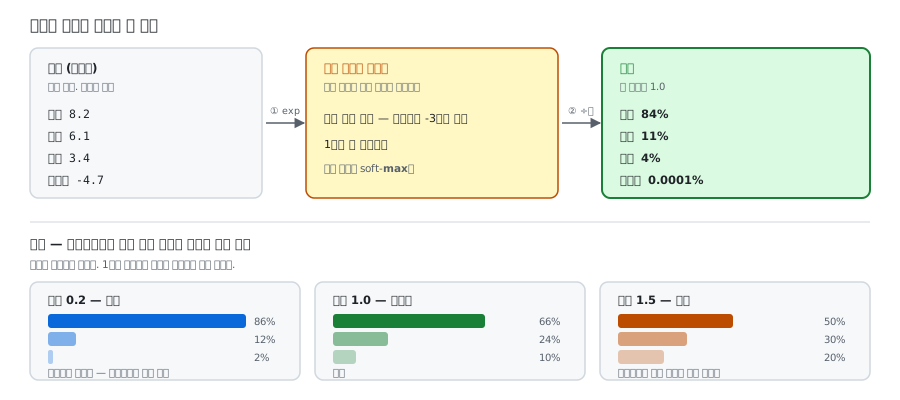
<p>모델은 매 순간 <strong>모든 단어에 점수를 매긴다.</strong> 이 원점수를 <strong>로짓(logit)</strong>이라고 부른다.</p>

<div class="language-plaintext highlighter-rouge"><div class="highlight"><pre class="highlight"><code>"오늘 날씨가 정말" 다음에 올 단어의 로짓
  좋다 :  8.2
  덥다 :  6.1
  이상 :  3.4
  바나나: -4.7
   ... (10만 개 단어 전부)
</code></pre></div></div>

<p>이 점수들은 그냥 숫자라서 “얼마나 확실한지”를 말할 수 없다. 소프트맥스를 통과시키면 확률이 된다.</p>

<div class="language-plaintext highlighter-rouge"><div class="highlight"><pre class="highlight"><code>  좋다 : 84%
  덥다 : 11%
  이상 :  4%
  바나나: 0.0001%
</code></pre></div></div>

<p>그리고 이 확률에 따라 주사위를 굴려 하나를 뽑는다. 이걸 <strong>샘플링</strong>이라고 한다.</p>

<h3 id="온도temperature의-정체">온도(temperature)의 정체</h3>

<p>에이전트 설정에서 자주 보는 <code class="language-plaintext highlighter-rouge">temperature</code>는 <strong>소프트맥스에 들어가기 전에 로짓을 나누는 숫자</strong>다. 딱 그것뿐이다.</p>

<table>
  <thead>
    <tr>
      <th>온도</th>
      <th>계산</th>
      <th>결과</th>
      <th>성격</th>
    </tr>
  </thead>
  <tbody>
    <tr>
      <td>낮음 (0.2)</td>
      <td>로짓 ÷ 0.2 → 격차 확대</td>
      <td><code class="language-plaintext highlighter-rouge">[86%, 12%, 2%]</code></td>
      <td>뻔하지만 안정적</td>
    </tr>
    <tr>
      <td>보통 (1.0)</td>
      <td>그대로</td>
      <td><code class="language-plaintext highlighter-rouge">[66%, 24%, 10%]</code></td>
      <td>균형</td>
    </tr>
    <tr>
      <td>높음 (1.5)</td>
      <td>로짓 ÷ 1.5 → 격차 축소</td>
      <td><code class="language-plaintext highlighter-rouge">[50%, 30%, 20%]</code></td>
      <td>다양하지만 헛소리 위험</td>
    </tr>
  </tbody>
</table>

<p><strong>에이전트를 만들 때는 보통 온도를 낮게 쓴다.</strong> 도구 이름을 창의적으로 지어내면 안 되기 때문이다. 반대로 브레인스토밍용이라면 높게 둔다.</p>

<h3 id="계산은-두-줄이다">계산은 두 줄이다</h3>

<div class="language-python highlighter-rouge"><div class="highlight"><pre class="highlight"><code><span class="kn">import</span> <span class="nn">numpy</span> <span class="k">as</span> <span class="n">np</span>

<span class="n">logits</span> <span class="o">=</span> <span class="n">np</span><span class="p">.</span><span class="n">array</span><span class="p">([</span><span class="mf">2.0</span><span class="p">,</span> <span class="mf">1.0</span><span class="p">,</span> <span class="mf">0.1</span><span class="p">])</span>      <span class="c1"># 모델이 내놓은 원점수
</span>
<span class="n">exp_values</span> <span class="o">=</span> <span class="n">np</span><span class="p">.</span><span class="n">exp</span><span class="p">(</span><span class="n">logits</span><span class="p">)</span>             <span class="c1"># ① 전부 양수로, 격차를 벌린다
# → [7.389, 2.718, 1.105]
</span>
<span class="n">probs</span> <span class="o">=</span> <span class="n">exp_values</span> <span class="o">/</span> <span class="n">exp_values</span><span class="p">.</span><span class="nb">sum</span><span class="p">()</span>   <span class="c1"># ② 전체 합으로 나눈다
# → [0.659, 0.242, 0.099]   ← 다 더하면 1.0
</span></code></pre></div></div>

<p><strong>exp로 양수화 + 전체 합으로 나누기.</strong> 이게 전부다.</p>

<h3 id="모델-곳곳에-들어-있다">모델 곳곳에 들어 있다</h3>

<ul>
  <li><strong>다음 단어 고르기</strong> — 위에서 본 것</li>
  <li><strong>어텐션</strong> — Q와 K를 곱해 나온 관련도 점수를 확률로 바꿀 때</li>
  <li><strong>모델 안의 게이트</strong> — 여러 전문가 중 누구에게 보낼지 고를 때</li>
  <li><strong>확신 게이트</strong> — <code class="language-plaintext highlighter-rouge">if 확률 &lt; 0.7: 사람에게 확인</code> 같은 판단을 만들 때</li>
</ul>

<hr />

<h2 id="3-어디서-만났나">3. 어디서 만났나</h2>

<p>이 용어는 수업에서 정식으로 다루기 전에 따로 정리한 것이다.</p>

<p>다만 <strong>1회차</strong>에서 LLM을 배울 때 이미 그 자리에 있었다. “문맥을 바탕으로 다음에 올 내용을 예측한다”는 그 <strong>예측</strong>이 정확히 이 계산이다. 예측이라는 말이 실제로는 “모든 단어에 점수를 매기고 확률로 바꿔 하나를 뽑는 일”이었던 것이다.</p>

<p><a href="/blog/2026/08/31/hello-agent/">1회차 — AI Agent 학습 기록을 시작합니다</a></p>

<hr />

<h2 id="4-헷갈리는-개념">4. 헷갈리는 개념</h2>

<table>
  <thead>
    <tr>
      <th>이 용어</th>
      <th>비슷하지만 다른 것</th>
      <th>차이</th>
    </tr>
  </thead>
  <tbody>
    <tr>
      <td>소프트맥스</td>
      <td>로짓</td>
      <td>로짓은 <strong>들어가는 재료</strong>(원점수), 소프트맥스는 그걸 확률로 바꾸는 <strong>계산</strong></td>
    </tr>
    <tr>
      <td>소프트맥스</td>
      <td>하드맥스 (argmax)</td>
      <td>하드맥스는 1등에게 100%를 주고 끝낸다. 소프트맥스는 나머지도 살려 둔다</td>
    </tr>
    <tr>
      <td>소프트맥스</td>
      <td>정규화</td>
      <td>정규화는 크기를 맞추는 일 전반. 소프트맥스는 그중 “합이 1인 확률로 만드는” 한 가지</td>
    </tr>
    <tr>
      <td>소프트맥스</td>
      <td>샘플링</td>
      <td>소프트맥스는 확률로 <strong>바꾸기만</strong> 한다. 그 확률로 하나를 <strong>뽑는 건</strong> 샘플링이다</td>
    </tr>
  </tbody>
</table>

<hr />

<h2 id="5-많이들-오해하는-지점">5. 많이들 오해하는 지점</h2>

<p><strong>ㄱ. “온도는 창의성 다이얼이다”</strong></p>

<p>설정 화면에서 보면 딱 그렇게 느껴진다. 하지만 실제로 하는 일은 <strong>로짓을 나누는 것</strong> 하나다.</p>

<p>온도를 올리면 모델이 창의적으로 생각하는 게 아니라, <strong>덜 뻔한 선택지도 뽑힐 여지가 생기는 것</strong>이다. 그래서 온도를 올리면 재미있는 답이 나올 확률과 <strong>틀린 답이 나올 확률이 함께</strong> 올라간다. 창의성을 켜는 스위치가 아니라, 2등과 3등에게 기회를 더 주는 손잡이다.</p>

<p><strong>ㄴ. “확률이 84%면 84% 맞다는 뜻”</strong></p>

<p>아니다. 84%는 <strong>그 단어를 고를 가능성</strong>이지 <strong>정답일 확률</strong>이 아니다. 모델이 완전히 틀린 답에 95%를 줄 수도 있다. 모델은 “내가 얼마나 확신하는가”를 말한 것이지 “내가 얼마나 맞는가”를 말한 게 아니다.</p>

<p>이 구분이 중요한 이유가 있다. 확률이 낮으면 “잘 모르겠다”는 신호로 쓸 수 있지만, 확률이 높다고 해서 믿어도 된다는 보장은 없기 때문이다.</p>

<p><strong>ㄷ. “소프트맥스가 답을 고른다”</strong></p>

<p>고르지 않는다. 소프트맥스는 <strong>점수를 확률로 바꿔 놓기만</strong> 한다. 실제로 하나를 뽑는 건 그다음 단계인 샘플링이다.</p>

<p>이 둘이 나뉘어 있어서, 같은 확률표를 두고도 “가장 높은 것만 고른다”거나 “확률대로 주사위를 굴린다”거나 “상위 몇 개 중에서만 뽑는다” 같은 서로 다른 전략을 쓸 수 있다.</p>

<hr />

<h2 id="6-관련-용어">6. 관련 용어</h2>

<p><a class="term-link" href="/blog/2026/09/13/term-vector/">벡터</a> · <a class="term-link" href="/blog/2026/09/07/term-token/">토큰</a> · <a class="term-link" href="/blog/2026/09/13/term-qkv/">Q/K/V</a> · <a class="term-link" href="/blog/2026/09/13/term-gate/">게이트</a> · <a class="term-link" href="/blog/2026/09/13/term-mnist/">MNIST</a> · <a class="term-link" href="/blog/2026/09/09/term-llm/">LLM</a></p>]]></content><author><name>김송이</name></author><category term="glossary" /><category term="AI기초" /><category term="소프트맥스" /><category term="로짓" /><category term="온도" /><category term="확률" /><summary type="html"><![CDATA[]]></summary></entry><entry><title type="html">텐서</title><link href="https://songyee-ai.github.io/blog/2026/09/13/term-tensor/" rel="alternate" type="text/html" title="텐서" /><published>2026-09-13T00:00:00+09:00</published><updated>2026-09-13T00:00:00+09:00</updated><id>https://songyee-ai.github.io/blog/2026/09/13/term-tensor</id><content type="html" xml:base="https://songyee-ai.github.io/blog/2026/09/13/term-tensor/"><![CDATA[<!-- TODO: 회차 확정 — 수업에서 이 개념을 다루는 리뷰 글이 올라오면 lesson 값과 3번 섹션을 갱신할 것 -->

<h2 id="한-줄-정의">한 줄 정의</h2>

<blockquote>
  <p>숫자를 담는 그릇 전체를 아우르는 말. 차원이 몇이든</p>
</blockquote>

<hr />

<h2 id="1-비유로-이해하기">1. 비유로 이해하기</h2>

<p>숫자를 담는 그릇을 아파트로 생각해 보자. 방 하나, 한 층, 한 동, 여러 동. 텐서는 그중 하나가 아니라 <strong>단지 전체를 가리키는 말</strong>이다.</p>

<figure class="post-figure">
  <img src="/blog/assets/images/term-tensor/apartment-tensor.svg" alt="스칼라 벡터 행렬은 모두 텐서에 포함되며 텐서는 차원 수에 제한 없이 숫자를 담는 그릇 전체를 가리킨다" loading="lazy" />
  <figcaption>그림 1. 방 하나도, 한 층도, 한 동도 전부 이 단지 안이다</figcaption>
</figure>

<p>이게 텐서의 핵심이다. <strong>텐서는 특정한 모양이 아니라, 모양 전체를 아우르는 이름이다.</strong></p>

<table>
  <thead>
    <tr>
      <th>이름</th>
      <th>차원</th>
      <th>텐서로 부르면</th>
    </tr>
  </thead>
  <tbody>
    <tr>
      <td>스칼라</td>
      <td>0차원</td>
      <td>0차원 텐서</td>
    </tr>
    <tr>
      <td>벡터</td>
      <td>1차원</td>
      <td>1차원 텐서</td>
    </tr>
    <tr>
      <td>행렬</td>
      <td>2차원</td>
      <td>2차원 텐서</td>
    </tr>
    <tr>
      <td>(그 이상)</td>
      <td>3차원 이상</td>
      <td>3차원 텐서, 4차원 텐서…</td>
    </tr>
  </tbody>
</table>

<p>그래서 딥러닝 코드에서는 <strong>전부 그냥 “텐서”</strong>라고 부른다. TensorFlow라는 이름도 여기서 왔다.</p>

<hr />

<h2 id="2-왜-필요한가">2. 왜 필요한가</h2>

<h3 id="shape가-곧-스키마다">shape가 곧 스키마다</h3>

<p>스키마가 “이 정보는 이런 모양이어야 한다”는 약속이라면, 텐서에서 그 역할을 하는 게 <strong>shape</strong>다.</p>

<div class="language-python highlighter-rouge"><div class="highlight"><pre class="highlight"><code><span class="n">tensor</span><span class="p">.</span><span class="n">shape</span>  <span class="c1"># (32, 128, 768)
#               ↑    ↑    ↑
#            32문장 128토큰 각 768숫자
</span></code></pre></div></div>

<p>이 한 줄이 데이터의 구조를 전부 말해 준다. 그리고 <strong>딥러닝 에러의 절대다수가 모양이 안 맞아서 난다.</strong> 코드가 틀린 게 아니라 그릇이 안 맞는 것이다.</p>

<div class="language-plaintext highlighter-rouge"><div class="highlight"><pre class="highlight"><code>RuntimeError: mat1 and mat2 shapes cannot be multiplied (32x768 and 512x10)
</code></pre></div></div>

<p>그래서 딥러닝을 하다 막히면 가장 먼저 하는 일이 <code class="language-plaintext highlighter-rouge">print(x.shape)</code>다.</p>

<h3 id="배치--텐서가-필요한-가장-흔한-이유">배치 — 텐서가 필요한 가장 흔한 이유</h3>

<p>사진 한 장은 행렬(28, 28)이면 충분하다. 그런데 한 장씩 처리하면 너무 느리다. 그래서 <strong>32장을 겹쳐 쌓아 한꺼번에</strong> 넣는다.</p>

<div class="language-plaintext highlighter-rouge"><div class="highlight"><pre class="highlight"><code>사진 1장   (28, 28)        ← 행렬
사진 32장  (32, 28, 28)    ← 텐서
</code></pre></div></div>

<p>이렇게 여러 개를 묶는 걸 <strong>배치(batch)</strong>라고 한다. 3차원 이상의 텐서를 만나는 가장 흔한 이유가 배치다. 맨 앞 숫자가 “몇 개를 한꺼번에”인 경우가 많다.</p>

<h3 id="그릇이-바뀌는-전-과정">그릇이 바뀌는 전 과정</h3>

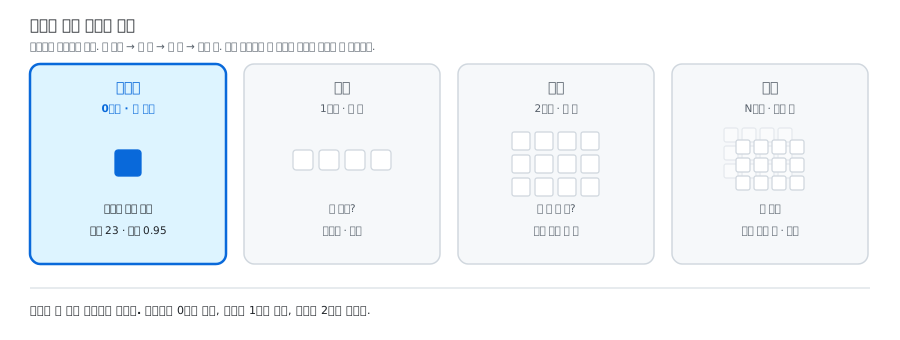
<p>“안녕 세상”이라는 입력이 글자가 되어 나오기까지, 같은 데이터가 여러 그릇을 갈아탄다.</p>

<figure class="post-figure">
  <img src="/blog/assets/images/term-tensor/shape-flow.svg" alt="안녕 세상이라는 문장이 토큰화 임베딩 배치 로짓 소프트맥스를 거쳐 토큰 하나로 나오기까지 그릇의 모양이 벡터 행렬 텐서 벡터 스칼라로 바뀐다" loading="lazy" />
  <figcaption>그림 2. 벡터 → 행렬 → 텐서 → 벡터 → 스칼라. 그릇이 커졌다 작아진다</figcaption>
</figure>

<p><strong>벡터 → 행렬 → 텐서 → 벡터 → 스칼라.</strong> 그릇이 커졌다가 다시 작아진다. 마지막에 나온 스칼라 하나가 토큰 하나가 되어 화면에 글자로 찍힌다.</p>

<p><strong>이게 LLM이 글을 쓰는 전 과정이다.</strong> 그리고 그 과정 내내 데이터는 계속 텐서였다.</p>

<hr />

<h2 id="3-어디서-만났나">3. 어디서 만났나</h2>

<p>이 용어는 수업에서 정식으로 다루기 전에 따로 정리한 것이다.</p>

<p>다만 앞선 회차에서 배운 것들이 전부 이 그릇에 담겨 있었다. <strong>1회차</strong>에서 LLM이 “패턴을 익혀 다음에 올 내용을 예측한다”고 배웠는데, 그 예측이 위 그림의 ④~⑥ 단계다.</p>

<p><a href="/blog/2026/08/31/hello-agent/">1회차 — AI Agent 학습 기록을 시작합니다</a></p>

<p><strong>7회차</strong>에서 배운 토큰과 컨텍스트도 마찬가지다. “컨텍스트가 길면 비싸다”는 말은, 위 그림에서 가운데 숫자(토큰 수)가 커진다는 뜻이다.</p>

<p><a href="/blog/2026/09/07/agent-mcp-skill/">7회차 — 에이전트, MCP, 스킬 — 범용 AI를 내 전용 조수로</a></p>

<hr />

<h2 id="4-헷갈리는-개념">4. 헷갈리는 개념</h2>

<table>
  <thead>
    <tr>
      <th>이 용어</th>
      <th>비슷하지만 다른 것</th>
      <th>차이</th>
    </tr>
  </thead>
  <tbody>
    <tr>
      <td>텐서</td>
      <td>행렬</td>
      <td>행렬은 <strong>딱 2차원</strong>. 텐서는 차원 수에 제한이 없고, 행렬도 텐서에 포함된다</td>
    </tr>
    <tr>
      <td>텐서</td>
      <td>shape</td>
      <td>텐서는 <strong>그릇 자체</strong>, shape는 그 그릇의 <strong>모양을 적어 놓은 것</strong></td>
    </tr>
    <tr>
      <td>텐서</td>
      <td>배치</td>
      <td>배치는 “여러 개를 한꺼번에 묶는 일”. 그 결과가 텐서로 나올 뿐이다</td>
    </tr>
    <tr>
      <td>딥러닝의 텐서</td>
      <td><strong>물리학의 텐서</strong></td>
      <td>물리·수학의 텐서는 좌표계가 바뀌어도 일정한 규칙으로 변환되는 양이라는, 훨씬 까다로운 개념이다. 딥러닝은 “다차원 숫자 덩어리”라는 뜻으로만 쓴다</td>
    </tr>
  </tbody>
</table>

<hr />

<h2 id="5-많이들-오해하는-지점">5. 많이들 오해하는 지점</h2>

<p><strong>ㄱ. “텐서는 3차원 이상짜리를 부르는 말”</strong></p>

<p>가장 흔한 오해다. 스칼라·벡터·행렬 다음에 텐서가 나오니 <strong>네 번째 단계</strong>처럼 읽히기 때문이다.</p>

<p>그렇지 않다. <strong>0차원도 텐서다.</strong> 텐서는 넷 중 하나가 아니라 <strong>넷을 전부 포함하는 말</strong>이다. 숫자 하나도 <code class="language-plaintext highlighter-rouge">torch.tensor(5)</code>로 만들면 어엿한 텐서다.</p>

<p><strong>ㄴ. “텐서는 어려운 특수 수학이라 따로 공부해야 한다”</strong></p>

<p>이름 때문에 생기는 겁이다. 물리학에서 말하는 텐서는 정말 어려운 개념이 맞다. 하지만 <strong>딥러닝에서 텐서는 그냥 다차원 숫자 덩어리</strong>다. 이름만 빌려 왔다고 봐도 크게 틀리지 않다.</p>

<p>실제로 필요한 건 딱 하나다. <strong>“이 데이터의 모양이 뭐지?”</strong>를 늘 확인하는 습관.</p>

<p><strong>ㄷ. “TensorFlow를 써야 텐서가 나오는 것”</strong></p>

<p>이름이 겹쳐서 생기는 오해다. PyTorch도, JAX도 전부 텐서라고 부른다. <strong>라이브러리 이름이 아니라 개념 이름이다.</strong> TensorFlow가 그 개념에서 이름을 따 온 것이지 그 반대가 아니다.</p>

<hr />

<h2 id="6-관련-용어">6. 관련 용어</h2>

<p><a class="term-link" href="/blog/2026/09/13/term-scalar/">스칼라</a> · <a class="term-link" href="/blog/2026/09/13/term-vector/">벡터</a> · <a class="term-link" href="/blog/2026/09/13/term-matrix/">행렬</a> · <a class="term-link" href="/blog/2026/09/13/term-embedding/">임베딩</a> · <a class="term-link" href="/blog/2026/09/13/term-softmax/">소프트맥스</a> · <a class="term-link" href="/blog/2026/09/13/term-mnist/">MNIST</a> · <a class="term-link" href="/blog/2026/09/04/term-schema/">스키마</a></p>]]></content><author><name>김송이</name></author><category term="glossary" /><category term="AI기초" /><category term="텐서" /><category term="shape" /><category term="배치" /><category term="차원" /><summary type="html"><![CDATA[]]></summary></entry><entry><title type="html">벡터</title><link href="https://songyee-ai.github.io/blog/2026/09/13/term-vector/" rel="alternate" type="text/html" title="벡터" /><published>2026-09-13T00:00:00+09:00</published><updated>2026-09-13T00:00:00+09:00</updated><id>https://songyee-ai.github.io/blog/2026/09/13/term-vector</id><content type="html" xml:base="https://songyee-ai.github.io/blog/2026/09/13/term-vector/"><![CDATA[<!-- TODO: 회차 확정 — 수업에서 이 개념을 다루는 리뷰 글이 올라오면 lesson 값과 3번 섹션을 갱신할 것 -->

<h2 id="한-줄-정의">한 줄 정의</h2>

<blockquote>
  <p>숫자를 한 줄로 늘어놓은 것. 1차원</p>
</blockquote>

<hr />

<h2 id="1-비유로-이해하기">1. 비유로 이해하기</h2>

<p>숫자를 담는 그릇을 아파트로 생각하면, 벡터는 <strong>한 층</strong>이다. 복도 하나에 방이 여러 개 있다.</p>

<figure class="post-figure">
  <img src="/blog/assets/images/term-vector/apartment-vector.svg" alt="숫자를 담는 그릇 네 가지 중 벡터는 한 층에 방이 여러 개 있는 1차원이다" loading="lazy" />
  <figcaption>그림 1. 한 층. 방을 찾으려면 몇 번째인지만 대면 된다</figcaption>
</figure>

<p>방을 찾아가려면 <strong>“몇 번째”</strong> 하나만 대면 된다. 필요한 정보가 하나라서 1차원이다.</p>

<div class="language-plaintext highlighter-rouge"><div class="highlight"><pre class="highlight"><code>[5, 3, 8, 1]
 ↑
 0번째 방
</code></pre></div></div>

<hr />

<h2 id="2-왜-필요한가">2. 왜 필요한가</h2>

<h3 id="숫자를-한-줄로-묶으면-비교할-수-있다">숫자를 한 줄로 묶으면 비교할 수 있다</h3>

<p>친구들의 성격을 숫자로 적어 본다고 하자.</p>

<div class="language-plaintext highlighter-rouge"><div class="highlight"><pre class="highlight"><code>            활발함  차분함  운동  독서
민수         [ 9,     2,    8,    1 ]
영희         [ 8,     3,    7,    2 ]
철수         [ 2,     9,    1,    9 ]
</code></pre></div></div>

<p>민수와 영희의 숫자가 비슷하다. 두 사람은 실제로 성격이 비슷하다. 철수는 숫자가 완전히 다르다.</p>

<p>여기서 벌어진 일이 중요하다. <strong>성격을 안 보고 숫자만 비교해도 누가 누구와 비슷한지 알 수 있게 됐다.</strong> 숫자 네 개를 한 줄로 묶어 놨기 때문이다.</p>

<p>컴퓨터는 “사과”라는 글자를 봐도 그게 “배”와 비슷하고 “자동차”와 다르다는 걸 모른다. 벡터로 바꿔 놓으면 계산으로 비교할 수 있게 된다.</p>

<div class="language-plaintext highlighter-rouge"><div class="highlight"><pre class="highlight"><code>사과   → [0.8, 0.2, 0.9, ...]  ┐
배     → [0.7, 0.3, 0.9, ...]  ┘ 가깝다
자동차 → [0.1, 0.9, 0.1, ...]    멀다
</code></pre></div></div>

<p>이게 <strong>의미 검색</strong>의 바닥이고, 그걸로 문서를 찾아 답하는 구조가 RAG다.</p>

<h3 id="ai에서-만나는-벡터들">AI에서 만나는 벡터들</h3>

<table>
  <thead>
    <tr>
      <th>무엇</th>
      <th>길이</th>
    </tr>
  </thead>
  <tbody>
    <tr>
      <td><strong>임베딩</strong></td>
      <td>숫자 768개 · 1536개 · 3072개</td>
    </tr>
    <tr>
      <td><strong>로짓</strong></td>
      <td>사전에 있는 모든 단어의 점수. 10만 개쯤</td>
    </tr>
    <tr>
      <td><strong>소프트맥스 결과</strong></td>
      <td>로짓과 같은 길이. 다만 값이 확률이고 다 더하면 1</td>
    </tr>
    <tr>
      <td><strong>토큰 ID 줄</strong></td>
      <td>문장을 토큰으로 쪼갠 번호들</td>
    </tr>
  </tbody>
</table>

<h3 id="길이가-곧-정보의-세밀함이다">길이가 곧 정보의 세밀함이다</h3>

<p>임베딩의 숫자가 768개인지 3072개인지는 <strong>뜻을 얼마나 잘게 나눠 담느냐</strong>의 차이다. 칸이 많을수록 미묘한 차이를 담을 수 있지만, 저장 공간도 계산량도 늘어난다.</p>

<p>그리고 각 숫자가 무슨 뜻인지는 <strong>사람이 정한 게 아니다.</strong> AI가 학습으로 알아낸 것이라 아무도 정확히 모른다. 다만 뜻이 담겨 있다는 증거는 있다.</p>

<div class="language-plaintext highlighter-rouge"><div class="highlight"><pre class="highlight"><code>왕 − 남자 + 여자 ≈ 여왕
서울 − 한국 + 일본 ≈ 도쿄
</code></pre></div></div>

<hr />

<h2 id="3-어디서-만났나">3. 어디서 만났나</h2>

<p>이 용어는 수업에서 정식으로 다루기 전에 따로 정리한 것이다.</p>

<p>다만 <strong>6회차</strong>에 벡터가 왜 필요한지를 보여 주는 자리가 있었다. 데이터베이스에서 <code class="language-plaintext highlighter-rouge">WHERE user = '민수'</code> 같은 검색은 <strong>글자가 정확히 같아야</strong> 찾아진다. “고양이”로 검색하면 “냥이”도 “반려묘”도 안 나온다.</p>

<p>벡터로 바꿔 두면 뜻으로 찾을 수 있다. 6회차에서 배운 검색의 한계가, 곧 벡터가 필요한 이유였다.</p>

<p><a href="/blog/2026/09/04/database-sql-backup/">6회차 — 데이터베이스, 서비스의 기억을 어디에 어떤 모양으로 둘까</a></p>

<hr />

<h2 id="4-헷갈리는-개념">4. 헷갈리는 개념</h2>

<table>
  <thead>
    <tr>
      <th>이 용어</th>
      <th>비슷하지만 다른 것</th>
      <th>차이</th>
    </tr>
  </thead>
  <tbody>
    <tr>
      <td>벡터</td>
      <td>스칼라</td>
      <td>스칼라는 숫자 하나. 벡터는 그걸 한 줄로 여러 개</td>
    </tr>
    <tr>
      <td>벡터</td>
      <td>행렬</td>
      <td>벡터를 여러 줄 쌓으면 행렬. 벡터는 가로 한 줄, 행렬은 표</td>
    </tr>
    <tr>
      <td>벡터</td>
      <td>배열 · 리스트</td>
      <td>담는 모양은 비슷하지만, 벡터는 <strong>전부 같은 종류의 숫자</strong>이고 길이가 고정이며 통째로 더하고 곱하는 계산이 정의돼 있다</td>
    </tr>
    <tr>
      <td>딥러닝의 벡터</td>
      <td><strong>수학·물리의 벡터</strong></td>
      <td>물리에서는 크기와 <strong>방향</strong>이 있는 양(바람의 세기와 방향). 딥러닝에서는 대개 그냥 숫자 배열로 읽으면 된다</td>
    </tr>
  </tbody>
</table>

<hr />

<h2 id="5-많이들-오해하는-지점">5. 많이들 오해하는 지점</h2>

<p><strong>ㄱ. “벡터니까 화살표와 방향을 떠올려야 한다”</strong></p>

<p>학교에서 배운 벡터(크기 + 방향, 화살표) 때문에 생기는 부담이다. <strong>딥러닝에서 벡터라고 하면 대개 “숫자를 한 줄로 늘어놓은 것”으로 읽으면 된다.</strong> 화살표를 그릴 필요도, 방향을 상상할 필요도 없다.</p>

<p>다만 완전히 버리지는 말자. <strong>“두 임베딩이 얼마나 가까운가”를 잴 때는 방향 개념이 돌아온다.</strong> 두 숫자 뭉치가 같은 방향을 가리키는지 재는 방법을 <strong>코사인 유사도</strong>라고 하고, 결과는 -1(정반대)에서 1(똑같음) 사이로 나온다. 의미 검색은 이걸로 굴러간다.</p>

<p><strong>ㄴ. “벡터는 그냥 파이썬 리스트다”</strong></p>

<p>비슷해 보이지만 약속이 더 많다. 리스트에는 숫자와 글자를 섞어 넣을 수 있고 길이도 마음대로 바뀐다. 벡터는 <strong>전부 같은 종류의 숫자</strong>이고 길이가 정해져 있으며, 통째로 더하고 곱하는 연산이 정의돼 있다. 이 약속 덕분에 빠르게 계산할 수 있다.</p>

<p><strong>ㄷ. “벡터 DB에서 말하는 벡터는 다른 뜻인가”</strong></p>

<p>같은 것이다. <strong>임베딩 벡터를 모아 두고 비슷한 걸 빨리 찾아 주는 창고</strong>라서 벡터 데이터베이스다. Pinecone, Chroma, Qdrant 같은 것들이고, 확장 기능을 붙이면 SQLite로도 할 수 있다.</p>

<hr />

<h2 id="6-관련-용어">6. 관련 용어</h2>

<p><a class="term-link" href="/blog/2026/09/13/term-scalar/">스칼라</a> · <a class="term-link" href="/blog/2026/09/13/term-matrix/">행렬</a> · <a class="term-link" href="/blog/2026/09/13/term-tensor/">텐서</a> · <a class="term-link" href="/blog/2026/09/13/term-embedding/">임베딩</a> · <a class="term-link" href="/blog/2026/09/13/term-softmax/">소프트맥스</a></p>]]></content><author><name>김송이</name></author><category term="glossary" /><category term="AI기초" /><category term="벡터" /><category term="임베딩" /><category term="텐서" /><category term="차원" /><summary type="html"><![CDATA[]]></summary></entry></feed>